[ML101] Chương 8: Học Không Giám Sát (Unsupervised Learning)
K-Means, DBSCAN và các thuật toán clustering
Bài viết có tham khảo, sử dụng và sửa đổi tài nguyên từ kho lưu trữ handson-mlp, tuân thủ giấy phép Apache‑2.0. Chúng tôi chân thành cảm ơn tác giả Aurélien Géron (@aureliengeron) vì sự chia sẻ kiến thức tuyệt vời và những đóng góp quý giá cho cộng đồng.
Trong các chương trước, chúng ta chủ yếu tập trung vào Học có giám sát (Supervised Learning), nơi mục tiêu là dự đoán nhãn (label) từ dữ liệu đầu vào. Tuy nhiên, trong thực tế, dữ liệu được gán nhãn thường rất ít và tốn kém để tạo ra, trong khi dữ liệu chưa gán nhãn lại vô cùng phong phú. Học không giám sát (Unsupervised Learning) giải quyết vấn đề này bằng cách tìm ra các mẫu (patterns), cấu trúc hoặc tri thức ẩn giấu bên trong dữ liệu mà không cần bất kỳ nhãn nào.
Chương này sẽ đi sâu vào các kỹ thuật quan trọng nhất của học không giám sát, bao gồm:
- Phân cụm (Clustering): Gom nhóm các dữ liệu tương đồng nhau.
- Phát hiện bất thường (Anomaly Detection): Tìm kiếm các điểm dữ liệu khác biệt so với phần còn lại.
- Ước lượng mật độ (Density Estimation): Ước tính hàm phân phối xác suất của dữ liệu.
Bạn có thể chạy trực tiếp các đoạn mã code tại: Google Colab.
Cài đặt môi trường
Trước tiên, vẫn như thường lệ, chúng ta cần đảm bảo môi trường Python và các thư viện cần thiết như Scikit-Learn và Matplotlib được cài đặt đúng phiên bản để đảm bảo mã nguồn chạy ổn định.
# Yêu cầu Python 3.10 trở lên
import sys
assert sys.version_info >= (3, 10)
# Yêu cầu Scikit-Learn phiên bản 1.6.1 trở lên
from packaging.version import Version
import sklearn
assert Version(sklearn.__version__) >= Version("1.6.1")
# Thiết lập kích thước font chữ mặc định cho biểu đồ Matplotlib để dễ nhìn hơn
import matplotlib.pyplot as plt
plt.rc('font', size=14)
plt.rc('axes', labelsize=14, titlesize=14)
plt.rc('legend', fontsize=14)
plt.rc('xtick', labelsize=10)
plt.rc('ytick', labelsize=10)
1. Phân cụm (Clustering)
Giới thiệu – Phân loại (Classification) so với Phân cụm (Clustering)
Để hiểu rõ sự khác biệt, hãy xem xét bộ dữ liệu hoa Iris.
- Bên trái (Phân loại): Mỗi điểm dữ liệu đi kèm với một nhãn cụ thể (loài hoa). Các thuật toán như Logistic Regression hay SVM sẽ tìm đường ranh giới để phân chia các lớp này.
- Bên phải (Phân cụm): Chúng ta không có nhãn. Dữ liệu chỉ là các điểm trong không gian. Nhiệm vụ của thuật toán phân cụm là tự động phát hiện ra các nhóm dữ liệu tụ tập lại với nhau.
# extra code – đoạn này tạo Hình 8–1
import matplotlib.pyplot as plt
from sklearn.datasets import load_iris
# Tải dữ liệu Iris
data = load_iris()
X = data.data
y = data.target
data.target_names
plt.figure(figsize=(9, 3.5))
# Biểu đồ bên trái: Dữ liệu có nhãn (Classification)
plt.subplot(121)
plt.plot(X[y==0, 2], X[y==0, 3], "yo", label="Iris setosa")
plt.plot(X[y==1, 2], X[y==1, 3], "bs", label="Iris versicolor")
plt.plot(X[y==2, 2], X[y==2, 3], "g^", label="Iris virginica")
plt.xlabel("Petal length")
plt.ylabel("Petal width")
plt.grid()
plt.legend()
# Biểu đồ bên phải: Dữ liệu không nhãn (Clustering)
plt.subplot(122)
plt.scatter(X[:, 2], X[:, 3], c="k", marker=".")
plt.xlabel("Petal length")
plt.tick_params(labelleft=False)
plt.gca().set_axisbelow(True)
plt.grid()
plt.show()

Dưới đây là một ví dụ minh họa trước (chúng ta sẽ học kỹ hơn ở phần sau) về việc sử dụng Mô hình Hỗn hợp Gaussian (Gaussian Mixture Model - GMM) để phân tách các cụm này.
GMM có thể tìm ra các cụm khá tốt bằng cách sử dụng tất cả 4 đặc trưng (chiều dài/rộng đài hoa và cánh hoa). Đoạn mã sau ánh xạ (map) mỗi cụm tìm được với loài hoa phổ biến nhất trong cụm đó để so sánh với nhãn thực tế.
# extra code
import numpy as np
from scipy import stats
from sklearn.mixture import GaussianMixture
# Sử dụng GMM để phân cụm
y_pred = GaussianMixture(n_components=3, random_state=42).fit(X).predict(X)
# Ánh xạ từng cụm sang lớp (loài hoa) phổ biến nhất trong cụm đó
mapping = {}
for class_id in np.unique(y):
mode, _ = stats.mode(y_pred[y==class_id])
mapping[mode] = class_id
y_pred = np.array([mapping[cluster_id] for cluster_id in y_pred])
# Vẽ kết quả phân cụm
plt.plot(X[y_pred==0, 2], X[y_pred==0, 3], "yo", label="Cluster 1")
plt.plot(X[y_pred==1, 2], X[y_pred==1, 3], "bs", label="Cluster 2")
plt.plot(X[y_pred==2, 2], X[y_pred==2, 3], "g^", label="Cluster 3")
plt.xlabel("Petal length")
plt.ylabel("Petal width")
plt.legend(loc="upper left")
plt.grid()
plt.show()

Chúng ta có thể kiểm tra tỷ lệ các mẫu hoa Iris được gán đúng cụm (tương ứng với nhãn thực tế). Kết quả cho thấy độ chính xác rất cao, lên tới khoảng 96.6%.
# Tính tỷ lệ phần trăm mẫu được gán đúng cụm
(y_pred==y).sum() / len(y_pred)
np.float64(0.9666666666666667)
K-Means (K-Trung bình)
K-Means là một thuật toán đơn giản và hiệu quả, có khả năng phân cụm dữ liệu rất nhanh. Ý tưởng chính là tìm ra tâm cụm (centroids) và gán mỗi điểm dữ liệu vào tâm cụm gần nhất.
Huấn luyện và Dự đoán
Hãy bắt đầu bằng việc tạo ra một bộ dữ liệu giả lập gồm 5 nhóm (blobs) và huấn luyện mô hình K-Means.
from sklearn.cluster import KMeans
from sklearn.datasets import make_blobs
# extra code – tạo dữ liệu blobs giả lập
blob_centers = np.array([[ 0.2, 2.3], [-1.5 , 2.3], [-2.8, 1.8],
[-2.8, 2.8], [-2.8, 1.3]])
blob_std = np.array([0.4, 0.3, 0.1, 0.1, 0.1])
X, y = make_blobs(n_samples=2000, centers=blob_centers, cluster_std=blob_std,
random_state=7)
# Huấn luyện K-Means với k=5
k = 5
kmeans = KMeans(n_clusters=k, random_state=43)
y_pred = kmeans.fit_predict(X)
Sau khi huấn luyện, chúng ta có thể trực quan hóa các cụm mà K-Means đã tìm thấy. Lưu ý rằng thuật toán không biết nhãn thực sự, nó chỉ gom nhóm dựa trên khoảng cách.
# extra code – hàm vẽ biểu đồ các cụm
def plot_clusters(X, y=None):
plt.scatter(X[:, 0], X[:, 1], c=y, s=1)
plt.xlabel("$x_1$")
plt.ylabel("$x_2$", rotation=0)
plt.figure(figsize=(8, 4))
plot_clusters(X)
plt.gca().set_axisbelow(True)
plt.grid()
plt.show()
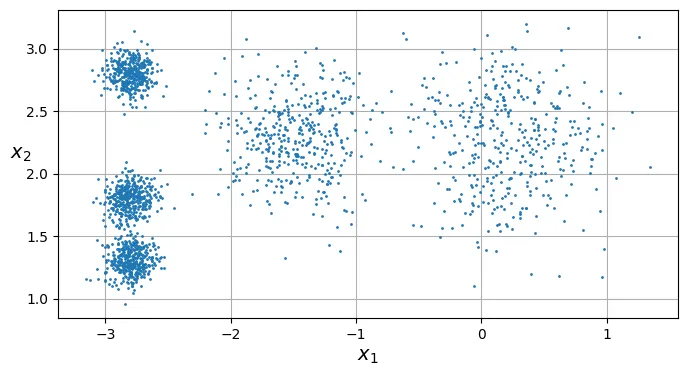
Mỗi điểm dữ liệu đã được gán một nhãn (từ 0 đến 4), đại diện cho chỉ số của cụm mà nó thuộc về. Bạn có thể truy cập các nhãn này thông qua thuộc tính labels_.
y_pred
array([4, 0, 1, ..., 2, 1, 0], dtype=int32)
y_pred is kmeans.labels_
True
Chúng ta cũng có thể xem tọa độ của 5 tâm cụm (centroids) mà thuật toán đã ước lượng được:
kmeans.cluster_centers_
array([[-2.80389616, 1.80117999],
[ 0.20876306, 2.25551336],
[-2.79290307, 2.79641063],
[-1.46679593, 2.28585348],
[-2.80037642, 1.30082566]])
Một điều cần lưu ý: nhãn cụm (0, 1, 2…) là ngẫu nhiên và phụ thuộc vào thứ tự khởi tạo, chúng không mang ý nghĩa ngữ nghĩa như “nhãn lớp” trong học có giám sát.
kmeans.labels_
array([4, 0, 1, ..., 2, 1, 0], dtype=int32)
Tất nhiên, bạn có thể sử dụng mô hình đã huấn luyện để dự đoán cụm cho các điểm dữ liệu mới:
import numpy as np
X_new = np.array([[0, 2], [3, 2], [-3, 3], [-3, 2.5]])
kmeans.predict(X_new)
array([1, 1, 2, 2], dtype=int32)
Ranh giới Quyết định (Decision Boundaries)
Khi vẽ ranh giới quyết định của K-Means, chúng ta sẽ nhận được một biểu đồ Voronoi (Voronoi diagram). Không gian được chia thành các ô, trong đó mọi điểm trong một ô đều gần tâm cụm của ô đó hơn bất kỳ tâm cụm nào khác.
# extra code – hàm vẽ ranh giới quyết định và tâm cụm
def plot_data(X):
plt.plot(X[:, 0], X[:, 1], 'k.', markersize=2)
def plot_centroids(centroids, weights=None, circle_color='w', cross_color='k'):
if weights is not None:
centroids = centroids[weights > weights.max() / 10]
plt.scatter(centroids[:, 0], centroids[:, 1],
marker='o', s=35, linewidths=8,
color=circle_color, zorder=10, alpha=0.9)
plt.scatter(centroids[:, 0], centroids[:, 1],
marker='x', s=2, linewidths=12,
color=cross_color, zorder=11, alpha=1)
def plot_decision_boundaries(clusterer, X, resolution=1000, show_centroids=True,
show_xlabels=True, show_ylabels=True):
mins = X.min(axis=0) - 0.1
maxs = X.max(axis=0) + 0.1
xx, yy = np.meshgrid(np.linspace(mins[0], maxs[0], resolution),
np.linspace(mins[1], maxs[1], resolution))
Z = clusterer.predict(np.c_[xx.ravel(), yy.ravel()])
Z = Z.reshape(xx.shape)
plt.contourf(Z, extent=(mins[0], maxs[0], mins[1], maxs[1]),
cmap="Pastel2")
plt.contour(Z, extent=(mins[0], maxs[0], mins[1], maxs[1]),
linewidths=1, colors='k')
plot_data(X)
if show_centroids:
plot_centroids(clusterer.cluster_centers_)
if show_xlabels:
plt.xlabel("$x_1$")
else:
plt.tick_params(labelbottom=False)
if show_ylabels:
plt.ylabel("$x_2$", rotation=0)
else:
plt.tick_params(labelleft=False)
plt.figure(figsize=(8, 4))
plot_decision_boundaries(kmeans, X)
plt.show()

Phân cụm Cứng (Hard Clustering) so với Phân cụm Mềm (Soft Clustering)
- Phân cụm cứng: Gán mỗi điểm dữ liệu vào duy nhất một cụm.
- Phân cụm mềm: Tính toán điểm số (thường là khoảng cách hoặc độ tương đồng) của mỗi điểm dữ liệu đối với tất cả các cụm.
Phương thức transform() trong Scikit-Learn trả về khoảng cách từ điểm dữ liệu đến từng tâm cụm (Euclidean distance). Điều này rất hữu ích khi dùng khoảng cách này làm đặc trưng đầu vào cho các thuật toán khác.
# Tính khoảng cách từ các điểm mới đến 5 tâm cụm
kmeans.transform(X_new).round(2)
array([[2.81, 0.33, 2.9 , 1.49, 2.89],
[5.81, 2.8 , 5.85, 4.48, 5.84],
[1.21, 3.29, 0.29, 1.69, 1.71],
[0.73, 3.22, 0.36, 1.55, 1.22]])
Bạn có thể xác minh rằng kết quả trên chính xác là khoảng cách Euclidean:
# extra code - Kiểm tra thủ công khoảng cách Euclidean
np.linalg.norm(np.tile(X_new, (1, k)).reshape(-1, k, 2)
- kmeans.cluster_centers_, axis=2).round(2)
array([[2.81, 0.33, 2.9 , 1.49, 2.89],
[5.81, 2.8 , 5.85, 4.48, 5.84],
[1.21, 3.29, 0.29, 1.69, 1.71],
[0.73, 3.22, 0.36, 1.55, 1.22]])
Thuật toán K-Means
Thuật toán K-Means hoạt động theo quy trình lặp đi lặp lại rất đơn giản:
- Khởi tạo: Chọn ngẫu nhiên điểm làm tâm cụm ban đầu (centroids).
- Lặp cho đến khi hội tụ (tâm cụm không thay đổi nữa):
- Gán: Gán mỗi điểm dữ liệu vào tâm cụm gần nhất.
- Cập nhật: Tính lại vị trí tâm cụm bằng trung bình cộng (mean) của tất cả các điểm thuộc cụm đó.
Dưới đây, chúng ta sẽ mô phỏng quá trình này qua 3 vòng lặp đầu tiên để xem các tâm cụm di chuyển như thế nào.
# extra code – tạo hình 8–4 mô phỏng các bước lặp của K-Means
kmeans_iter1 = KMeans(n_clusters=5, init="random", n_init=1, max_iter=1,
random_state=18)
kmeans_iter2 = KMeans(n_clusters=5, init="random", n_init=1, max_iter=2,
random_state=18)
kmeans_iter3 = KMeans(n_clusters=5, init="random", n_init=1, max_iter=3,
random_state=18)
kmeans_iter1.fit(X)
kmeans_iter2.fit(X)
kmeans_iter3.fit(X)
plt.figure(figsize=(10, 8))
plt.subplot(321)
plot_data(X)
plot_centroids(kmeans_iter1.cluster_centers_, circle_color='r', cross_color='w')
plt.ylabel("$x_2$", rotation=0)
plt.tick_params(labelbottom=False)
plt.title("Update the centroids (initially randomly)")
plt.subplot(322)
plot_decision_boundaries(kmeans_iter1, X, show_xlabels=False,
show_ylabels=False)
plt.title("Label the instances")
plt.subplot(323)
plot_decision_boundaries(kmeans_iter1, X, show_centroids=False,
show_xlabels=False)
plot_centroids(kmeans_iter2.cluster_centers_)
plt.subplot(324)
plot_decision_boundaries(kmeans_iter2, X, show_xlabels=False,
show_ylabels=False)
plt.subplot(325)
plot_decision_boundaries(kmeans_iter2, X, show_centroids=False)
plot_centroids(kmeans_iter3.cluster_centers_)
plt.subplot(326)
plot_decision_boundaries(kmeans_iter3, X, show_ylabels=False)
plt.show()

Sự biến thiên của K-Means (K-Means Variability)
Vấn đề lớn nhất của K-Means cơ bản là sự phụ thuộc vào khởi tạo ngẫu nhiên. Nếu xui xẻo chọn phải các tâm cụm ban đầu không tốt, thuật toán có thể hội tụ tại một cực trị địa phương (local optimum) thay vì giải pháp tốt nhất toàn cục.
Dưới đây là ví dụ về hai lần chạy với khởi tạo ngẫu nhiên khác nhau dẫn đến hai kết quả phân cụm khác hẳn nhau (và đều không tối ưu).
# extra code – tạo hình 8–5 so sánh các khởi tạo khác nhau
def plot_clusterer_comparison(clusterer1, clusterer2, X, title1=None,
title2=None):
clusterer1.fit(X)
clusterer2.fit(X)
plt.figure(figsize=(10, 3.2))
plt.subplot(121)
plot_decision_boundaries(clusterer1, X)
if title1:
plt.title(title1)
plt.subplot(122)
plot_decision_boundaries(clusterer2, X, show_ylabels=False)
if title2:
plt.title(title2)
kmeans_rnd_init1 = KMeans(n_clusters=5, init="random", n_init=1, random_state=2)
kmeans_rnd_init2 = KMeans(n_clusters=5, init="random", n_init=1, random_state=8)
plot_clusterer_comparison(kmeans_rnd_init1, kmeans_rnd_init2, X,
"Solution 1",
"Solution 2 (with a different random init)")
plt.show()
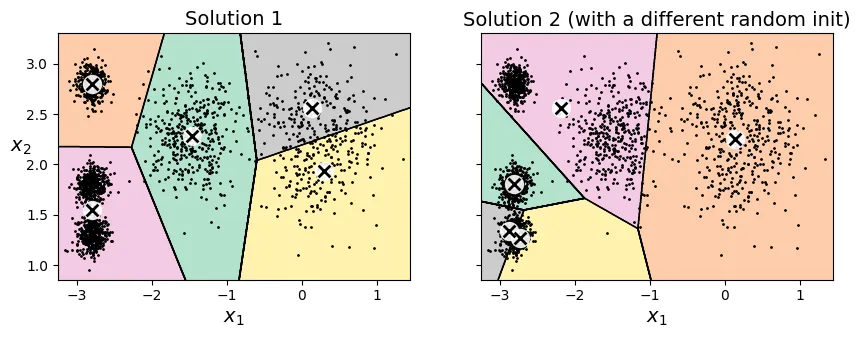
Nếu bạn biết trước vị trí gần đúng của các tâm cụm, bạn có thể truyền chúng vào tham số init để hướng dẫn thuật toán, giúp nó hội tụ đúng chỗ.
# Khởi tạo thủ công các tâm cụm
good_init = np.array([[-3, 3], [-3, 2], [-3, 1], [-1, 2], [0, 2]])
kmeans = KMeans(n_clusters=5, init=good_init, random_state=42)
kmeans.fit(X)
KMeans(init=array([[-3, 3],
[-3, 2],
[-3, 1],
[-1, 2],
[ 0, 2]]),
n_clusters=5, random_state=42)Parameters
<tr class="user-set">
<td><i class="copy-paste-icon"
onclick="copyToClipboard('n_clusters',
this.parentElement.nextElementSibling)"
></i></td>
<td class="param">
<a class="param-doc-link"
rel="noreferrer" target="_blank" href="https://scikit-learn.org/1.8/modules/generated/sklearn.cluster.KMeans.html#:~:text=n_clusters,-int%2C%20default%3D8">
n_clusters
<span class="param-doc-description">n_clusters: int, default=8<br><br>The number of clusters to form as well as the number of<br>centroids to generate.<br><br>For an example of how to choose an optimal value for `n_clusters` refer to<br>:ref:`sphx_glr_auto_examples_cluster_plot_kmeans_silhouette_analysis.py`.</span>
</a>
</td>
<td class="value">5</td>
</tr>
<tr class="user-set">
<td><i class="copy-paste-icon"
onclick="copyToClipboard('init',
this.parentElement.nextElementSibling)"
></i></td>
<td class="param">
<a class="param-doc-link"
rel="noreferrer" target="_blank" href="https://scikit-learn.org/1.8/modules/generated/sklearn.cluster.KMeans.html#:~:text=init,-%7B%27k-means%2B%2B%27%2C%20%27random%27%7D%2C%20callable%20or%20array-like%20of%20shape%20%20%20%20%20%20%20%20%20%20%20%20%20%28n_clusters%2C%20n_features%29%2C%20default%3D%27k-means%2B%2B%27">
init
<span class="param-doc-description">init: {'k-means++', 'random'}, callable or array-like of shape (n_clusters, n_features), default='k-means++'<br><br>Method for initialization:<br><br>* 'k-means++' : selects initial cluster centroids using sampling based on an empirical probability distribution of the points' contribution to the overall inertia. This technique speeds up convergence. The algorithm implemented is "greedy k-means++". It differs from the vanilla k-means++ by making several trials at each sampling step and choosing the best centroid among them.<br><br>* 'random': choose `n_clusters` observations (rows) at random from data for the initial centroids.<br><br>* If an array is passed, it should be of shape (n_clusters, n_features) and gives the initial centers.<br><br>* If a callable is passed, it should take arguments X, n_clusters and a random state and return an initialization.<br><br>For an example of how to use the different `init` strategies, see<br>:ref:`sphx_glr_auto_examples_cluster_plot_kmeans_digits.py`.<br><br>For an evaluation of the impact of initialization, see the example<br>:ref:`sphx_glr_auto_examples_cluster_plot_kmeans_stability_low_dim_dense.py`.</span>
</a>
</td>
<td class="value">array([[-3, ... [ 0, 2]])</td>
</tr>
<tr class="default">
<td><i class="copy-paste-icon"
onclick="copyToClipboard('n_init',
this.parentElement.nextElementSibling)"
></i></td>
<td class="param">
<a class="param-doc-link"
rel="noreferrer" target="_blank" href="https://scikit-learn.org/1.8/modules/generated/sklearn.cluster.KMeans.html#:~:text=n_init,-%27auto%27%20or%20int%2C%20default%3D%27auto%27">
n_init
<span class="param-doc-description">n_init: 'auto' or int, default='auto'<br><br>Number of times the k-means algorithm is run with different centroid<br>seeds. The final results is the best output of `n_init` consecutive runs<br>in terms of inertia. Several runs are recommended for sparse<br>high-dimensional problems (see :ref:`kmeans_sparse_high_dim`).<br><br>When `n_init='auto'`, the number of runs depends on the value of init:<br>10 if using `init='random'` or `init` is a callable;<br>1 if using `init='k-means++'` or `init` is an array-like.<br><br>.. versionadded:: 1.2<br> Added 'auto' option for `n_init`.<br><br>.. versionchanged:: 1.4<br> Default value for `n_init` changed to `'auto'`.</span>
</a>
</td>
<td class="value">'auto'</td>
</tr>
<tr class="default">
<td><i class="copy-paste-icon"
onclick="copyToClipboard('max_iter',
this.parentElement.nextElementSibling)"
></i></td>
<td class="param">
<a class="param-doc-link"
rel="noreferrer" target="_blank" href="https://scikit-learn.org/1.8/modules/generated/sklearn.cluster.KMeans.html#:~:text=max_iter,-int%2C%20default%3D300">
max_iter
<span class="param-doc-description">max_iter: int, default=300<br><br>Maximum number of iterations of the k-means algorithm for a<br>single run.</span>
</a>
</td>
<td class="value">300</td>
</tr>
<tr class="default">
<td><i class="copy-paste-icon"
onclick="copyToClipboard('tol',
this.parentElement.nextElementSibling)"
></i></td>
<td class="param">
<a class="param-doc-link"
rel="noreferrer" target="_blank" href="https://scikit-learn.org/1.8/modules/generated/sklearn.cluster.KMeans.html#:~:text=tol,-float%2C%20default%3D1e-4">
tol
<span class="param-doc-description">tol: float, default=1e-4<br><br>Relative tolerance with regards to Frobenius norm of the difference<br>in the cluster centers of two consecutive iterations to declare<br>convergence.</span>
</a>
</td>
<td class="value">0.0001</td>
</tr>
<tr class="default">
<td><i class="copy-paste-icon"
onclick="copyToClipboard('verbose',
this.parentElement.nextElementSibling)"
></i></td>
<td class="param">
<a class="param-doc-link"
rel="noreferrer" target="_blank" href="https://scikit-learn.org/1.8/modules/generated/sklearn.cluster.KMeans.html#:~:text=verbose,-int%2C%20default%3D0">
verbose
<span class="param-doc-description">verbose: int, default=0<br><br>Verbosity mode.</span>
</a>
</td>
<td class="value">0</td>
</tr>
<tr class="user-set">
<td><i class="copy-paste-icon"
onclick="copyToClipboard('random_state',
this.parentElement.nextElementSibling)"
></i></td>
<td class="param">
<a class="param-doc-link"
rel="noreferrer" target="_blank" href="https://scikit-learn.org/1.8/modules/generated/sklearn.cluster.KMeans.html#:~:text=random_state,-int%2C%20RandomState%20instance%20or%20None%2C%20default%3DNone">
random_state
<span class="param-doc-description">random_state: int, RandomState instance or None, default=None<br><br>Determines random number generation for centroid initialization. Use<br>an int to make the randomness deterministic.<br>See :term:`Glossary <random_state>`.</span>
</a>
</td>
<td class="value">42</td>
</tr>
<tr class="default">
<td><i class="copy-paste-icon"
onclick="copyToClipboard('copy_x',
this.parentElement.nextElementSibling)"
></i></td>
<td class="param">
<a class="param-doc-link"
rel="noreferrer" target="_blank" href="https://scikit-learn.org/1.8/modules/generated/sklearn.cluster.KMeans.html#:~:text=copy_x,-bool%2C%20default%3DTrue">
copy_x
<span class="param-doc-description">copy_x: bool, default=True<br><br>When pre-computing distances it is more numerically accurate to center<br>the data first. If copy_x is True (default), then the original data is<br>not modified. If False, the original data is modified, and put back<br>before the function returns, but small numerical differences may be<br>introduced by subtracting and then adding the data mean. Note that if<br>the original data is not C-contiguous, a copy will be made even if<br>copy_x is False. If the original data is sparse, but not in CSR format,<br>a copy will be made even if copy_x is False.</span>
</a>
</td>
<td class="value">True</td>
</tr>
<tr class="default">
<td><i class="copy-paste-icon"
onclick="copyToClipboard('algorithm',
this.parentElement.nextElementSibling)"
></i></td>
<td class="param">
<a class="param-doc-link"
rel="noreferrer" target="_blank" href="https://scikit-learn.org/1.8/modules/generated/sklearn.cluster.KMeans.html#:~:text=algorithm,-%7B%22lloyd%22%2C%20%22elkan%22%7D%2C%20default%3D%22lloyd%22">
algorithm
<span class="param-doc-description">algorithm: {"lloyd", "elkan"}, default="lloyd"<br><br>K-means algorithm to use. The classical EM-style algorithm is `"lloyd"`.<br>The `"elkan"` variation can be more efficient on some datasets with<br>well-defined clusters, by using the triangle inequality. However it's<br>more memory intensive due to the allocation of an extra array of shape<br>`(n_samples, n_clusters)`.<br><br>.. versionchanged:: 0.18<br> Added Elkan algorithm<br><br>.. versionchanged:: 1.1<br> Renamed "full" to "lloyd", and deprecated "auto" and "full".<br> Changed "auto" to use "lloyd" instead of "elkan".</span>
</a>
</td>
<td class="value">'lloyd'</td>
</tr>
</tbody>
</table>
</details>
</div>
</div></div></div></div></div></body>
# extra code - vẽ kết quả khởi tạo tốt
plt.figure(figsize=(8, 4))
plot_decision_boundaries(kmeans, X)

Quán tính (Inertia)
Để đánh giá xem mô hình K-Means tốt hay xấu (vì không có nhãn để so sánh), chúng ta sử dụng một chỉ số gọi là Quán tính (Inertia).
Inertia chính là tổng bình phương khoảng cách giữa mỗi điểm dữ liệu và tâm cụm gần nhất của nó. Inertia càng nhỏ, các điểm càng nằm gần tâm cụm, nghĩa là cụm càng chặt chẽ.
kmeans.inertia_
211.59853725816828
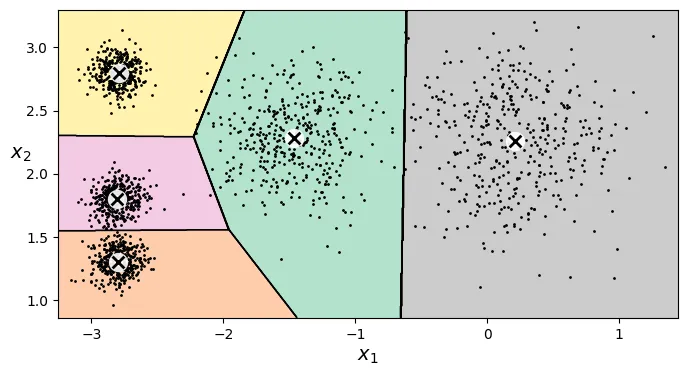
Hãy so sánh Inertia của mô hình tốt với hai mô hình khởi tạo ngẫu nhiên xấu ở trên. Bạn sẽ thấy Inertia của mô hình tốt thấp hơn nhiều.
kmeans_rnd_init1.inertia_ # extra code
219.58201503602285
kmeans_rnd_init2.inertia_ # extra code
600.3600713094229
Lưu ý rằng phương thức score() trong Scikit-Learn trả về giá trị Inertia âm. Lý do là vì quy tắc chung của thư viện này là “điểm càng cao càng tốt” (như accuracy), trong khi Inertia thì “càng thấp càng tốt”.
kmeans.score(X)
-211.59853725816828
Đa khởi tạo (Multiple Initializations)
Để giải quyết vấn đề hội tụ sai, giải pháp đơn giản nhất là chạy thuật toán nhiều lần với các khởi tạo ngẫu nhiên khác nhau và chọn mô hình có Inertia thấp nhất.
Trong Scikit-Learn, tham số n_init kiểm soát số lần chạy này. Theo mặc định, KMeans sẽ chạy thuật toán nhiều lần và giữ lại kết quả tốt nhất.
# extra code
kmeans_rnd_10_inits = KMeans(n_clusters=5, init="random", n_init=10,
random_state=2)
kmeans_rnd_10_inits.fit(X)
KMeans(init='random', n_clusters=5, n_init=10, random_state=2)
Parameters
<tr class="user-set">
<td><i class="copy-paste-icon"
onclick="copyToClipboard('n_clusters',
this.parentElement.nextElementSibling)"
></i></td>
<td class="param">
<a class="param-doc-link"
rel="noreferrer" target="_blank" href="https://scikit-learn.org/1.8/modules/generated/sklearn.cluster.KMeans.html#:~:text=n_clusters,-int%2C%20default%3D8">
n_clusters
<span class="param-doc-description">n_clusters: int, default=8<br><br>The number of clusters to form as well as the number of<br>centroids to generate.<br><br>For an example of how to choose an optimal value for `n_clusters` refer to<br>:ref:`sphx_glr_auto_examples_cluster_plot_kmeans_silhouette_analysis.py`.</span>
</a>
</td>
<td class="value">5</td>
</tr>
<tr class="user-set">
<td><i class="copy-paste-icon"
onclick="copyToClipboard('init',
this.parentElement.nextElementSibling)"
></i></td>
<td class="param">
<a class="param-doc-link"
rel="noreferrer" target="_blank" href="https://scikit-learn.org/1.8/modules/generated/sklearn.cluster.KMeans.html#:~:text=init,-%7B%27k-means%2B%2B%27%2C%20%27random%27%7D%2C%20callable%20or%20array-like%20of%20shape%20%20%20%20%20%20%20%20%20%20%20%20%20%28n_clusters%2C%20n_features%29%2C%20default%3D%27k-means%2B%2B%27">
init
<span class="param-doc-description">init: {'k-means++', 'random'}, callable or array-like of shape (n_clusters, n_features), default='k-means++'<br><br>Method for initialization:<br><br>* 'k-means++' : selects initial cluster centroids using sampling based on an empirical probability distribution of the points' contribution to the overall inertia. This technique speeds up convergence. The algorithm implemented is "greedy k-means++". It differs from the vanilla k-means++ by making several trials at each sampling step and choosing the best centroid among them.<br><br>* 'random': choose `n_clusters` observations (rows) at random from data for the initial centroids.<br><br>* If an array is passed, it should be of shape (n_clusters, n_features) and gives the initial centers.<br><br>* If a callable is passed, it should take arguments X, n_clusters and a random state and return an initialization.<br><br>For an example of how to use the different `init` strategies, see<br>:ref:`sphx_glr_auto_examples_cluster_plot_kmeans_digits.py`.<br><br>For an evaluation of the impact of initialization, see the example<br>:ref:`sphx_glr_auto_examples_cluster_plot_kmeans_stability_low_dim_dense.py`.</span>
</a>
</td>
<td class="value">'random'</td>
</tr>
<tr class="user-set">
<td><i class="copy-paste-icon"
onclick="copyToClipboard('n_init',
this.parentElement.nextElementSibling)"
></i></td>
<td class="param">
<a class="param-doc-link"
rel="noreferrer" target="_blank" href="https://scikit-learn.org/1.8/modules/generated/sklearn.cluster.KMeans.html#:~:text=n_init,-%27auto%27%20or%20int%2C%20default%3D%27auto%27">
n_init
<span class="param-doc-description">n_init: 'auto' or int, default='auto'<br><br>Number of times the k-means algorithm is run with different centroid<br>seeds. The final results is the best output of `n_init` consecutive runs<br>in terms of inertia. Several runs are recommended for sparse<br>high-dimensional problems (see :ref:`kmeans_sparse_high_dim`).<br><br>When `n_init='auto'`, the number of runs depends on the value of init:<br>10 if using `init='random'` or `init` is a callable;<br>1 if using `init='k-means++'` or `init` is an array-like.<br><br>.. versionadded:: 1.2<br> Added 'auto' option for `n_init`.<br><br>.. versionchanged:: 1.4<br> Default value for `n_init` changed to `'auto'`.</span>
</a>
</td>
<td class="value">10</td>
</tr>
<tr class="default">
<td><i class="copy-paste-icon"
onclick="copyToClipboard('max_iter',
this.parentElement.nextElementSibling)"
></i></td>
<td class="param">
<a class="param-doc-link"
rel="noreferrer" target="_blank" href="https://scikit-learn.org/1.8/modules/generated/sklearn.cluster.KMeans.html#:~:text=max_iter,-int%2C%20default%3D300">
max_iter
<span class="param-doc-description">max_iter: int, default=300<br><br>Maximum number of iterations of the k-means algorithm for a<br>single run.</span>
</a>
</td>
<td class="value">300</td>
</tr>
<tr class="default">
<td><i class="copy-paste-icon"
onclick="copyToClipboard('tol',
this.parentElement.nextElementSibling)"
></i></td>
<td class="param">
<a class="param-doc-link"
rel="noreferrer" target="_blank" href="https://scikit-learn.org/1.8/modules/generated/sklearn.cluster.KMeans.html#:~:text=tol,-float%2C%20default%3D1e-4">
tol
<span class="param-doc-description">tol: float, default=1e-4<br><br>Relative tolerance with regards to Frobenius norm of the difference<br>in the cluster centers of two consecutive iterations to declare<br>convergence.</span>
</a>
</td>
<td class="value">0.0001</td>
</tr>
<tr class="default">
<td><i class="copy-paste-icon"
onclick="copyToClipboard('verbose',
this.parentElement.nextElementSibling)"
></i></td>
<td class="param">
<a class="param-doc-link"
rel="noreferrer" target="_blank" href="https://scikit-learn.org/1.8/modules/generated/sklearn.cluster.KMeans.html#:~:text=verbose,-int%2C%20default%3D0">
verbose
<span class="param-doc-description">verbose: int, default=0<br><br>Verbosity mode.</span>
</a>
</td>
<td class="value">0</td>
</tr>
<tr class="user-set">
<td><i class="copy-paste-icon"
onclick="copyToClipboard('random_state',
this.parentElement.nextElementSibling)"
></i></td>
<td class="param">
<a class="param-doc-link"
rel="noreferrer" target="_blank" href="https://scikit-learn.org/1.8/modules/generated/sklearn.cluster.KMeans.html#:~:text=random_state,-int%2C%20RandomState%20instance%20or%20None%2C%20default%3DNone">
random_state
<span class="param-doc-description">random_state: int, RandomState instance or None, default=None<br><br>Determines random number generation for centroid initialization. Use<br>an int to make the randomness deterministic.<br>See :term:`Glossary <random_state>`.</span>
</a>
</td>
<td class="value">2</td>
</tr>
<tr class="default">
<td><i class="copy-paste-icon"
onclick="copyToClipboard('copy_x',
this.parentElement.nextElementSibling)"
></i></td>
<td class="param">
<a class="param-doc-link"
rel="noreferrer" target="_blank" href="https://scikit-learn.org/1.8/modules/generated/sklearn.cluster.KMeans.html#:~:text=copy_x,-bool%2C%20default%3DTrue">
copy_x
<span class="param-doc-description">copy_x: bool, default=True<br><br>When pre-computing distances it is more numerically accurate to center<br>the data first. If copy_x is True (default), then the original data is<br>not modified. If False, the original data is modified, and put back<br>before the function returns, but small numerical differences may be<br>introduced by subtracting and then adding the data mean. Note that if<br>the original data is not C-contiguous, a copy will be made even if<br>copy_x is False. If the original data is sparse, but not in CSR format,<br>a copy will be made even if copy_x is False.</span>
</a>
</td>
<td class="value">True</td>
</tr>
<tr class="default">
<td><i class="copy-paste-icon"
onclick="copyToClipboard('algorithm',
this.parentElement.nextElementSibling)"
></i></td>
<td class="param">
<a class="param-doc-link"
rel="noreferrer" target="_blank" href="https://scikit-learn.org/1.8/modules/generated/sklearn.cluster.KMeans.html#:~:text=algorithm,-%7B%22lloyd%22%2C%20%22elkan%22%7D%2C%20default%3D%22lloyd%22">
algorithm
<span class="param-doc-description">algorithm: {"lloyd", "elkan"}, default="lloyd"<br><br>K-means algorithm to use. The classical EM-style algorithm is `"lloyd"`.<br>The `"elkan"` variation can be more efficient on some datasets with<br>well-defined clusters, by using the triangle inequality. However it's<br>more memory intensive due to the allocation of an extra array of shape<br>`(n_samples, n_clusters)`.<br><br>.. versionchanged:: 0.18<br> Added Elkan algorithm<br><br>.. versionchanged:: 1.1<br> Renamed "full" to "lloyd", and deprecated "auto" and "full".<br> Changed "auto" to use "lloyd" instead of "elkan".</span>
</a>
</td>
<td class="value">'lloyd'</td>
</tr>
</tbody>
</table>
</details>
</div>
</div></div></div></div></div></body>
# extra code - vẽ kết quả sau khi chạy 10 lần khởi tạo
plt.figure(figsize=(8, 4))
plot_decision_boundaries(kmeans_rnd_10_inits, X)
plt.show()
Phương pháp khởi tạo K-Means++
Thay vì chọn ngẫu nhiên hoàn toàn, thuật toán K-Means++ chọn các tâm cụm ban đầu sao cho chúng nằm xa nhau nhất có thể. Điều này giúp thuật toán hội tụ nhanh hơn và tránh được các giải pháp tối ưu cục bộ tồi tệ.
Scikit-Learn sử dụng init="k-means++" làm mặc định. Nếu muốn dùng khởi tạo ngẫu nhiên thuần túy, bạn phải set init="random".
K-Means Tăng tốc (Accelerated K-Means) và Mini-Batch K-Means
Có những biến thể của K-Means giúp chạy nhanh hơn:
- Accelerated K-Means (Elkan’s algorithm): Tránh các phép tính khoảng cách không cần thiết bằng cách sử dụng bất đẳng thức tam giác. Đây là mặc định trong Scikit-Learn (
algorithm="elkan"hoặc"lloyd"). - Mini-Batch K-Means: Thay vì dùng toàn bộ dữ liệu ở mỗi bước lặp, nó chỉ dùng các lô nhỏ (mini-batches). Điều này giúp thuật toán chạy nhanh hơn nhiều trên dữ liệu lớn, dù Inertia có thể cao hơn một chút.
from sklearn.cluster import MiniBatchKMeans
# Sử dụng Mini-Batch K-Means
minibatch_kmeans = MiniBatchKMeans(n_clusters=5, random_state=42)
minibatch_kmeans.fit(X)
MiniBatchKMeans(n_clusters=5, random_state=42)
Parameters
<tr class="user-set">
<td><i class="copy-paste-icon"
onclick="copyToClipboard('n_clusters',
this.parentElement.nextElementSibling)"
></i></td>
<td class="param">
<a class="param-doc-link"
rel="noreferrer" target="_blank" href="https://scikit-learn.org/1.8/modules/generated/sklearn.cluster.MiniBatchKMeans.html#:~:text=n_clusters,-int%2C%20default%3D8">
n_clusters
<span class="param-doc-description">n_clusters: int, default=8<br><br>The number of clusters to form as well as the number of<br>centroids to generate.</span>
</a>
</td>
<td class="value">5</td>
</tr>
<tr class="default">
<td><i class="copy-paste-icon"
onclick="copyToClipboard('init',
this.parentElement.nextElementSibling)"
></i></td>
<td class="param">
<a class="param-doc-link"
rel="noreferrer" target="_blank" href="https://scikit-learn.org/1.8/modules/generated/sklearn.cluster.MiniBatchKMeans.html#:~:text=init,-%7B%27k-means%2B%2B%27%2C%20%27random%27%7D%2C%20callable%20or%20array-like%20of%20shape%20%20%20%20%20%20%20%20%20%20%20%20%20%28n_clusters%2C%20n_features%29%2C%20default%3D%27k-means%2B%2B%27">
init
<span class="param-doc-description">init: {'k-means++', 'random'}, callable or array-like of shape (n_clusters, n_features), default='k-means++'<br><br>Method for initialization:<br><br>'k-means++' : selects initial cluster centroids using sampling based on<br>an empirical probability distribution of the points' contribution to the<br>overall inertia. This technique speeds up convergence. The algorithm<br>implemented is "greedy k-means++". It differs from the vanilla k-means++<br>by making several trials at each sampling step and choosing the best centroid<br>among them.<br><br>'random': choose `n_clusters` observations (rows) at random from data<br>for the initial centroids.<br><br>If an array is passed, it should be of shape (n_clusters, n_features)<br>and gives the initial centers.<br><br>If a callable is passed, it should take arguments X, n_clusters and a<br>random state and return an initialization.<br><br>For an evaluation of the impact of initialization, see the example<br>:ref:`sphx_glr_auto_examples_cluster_plot_kmeans_stability_low_dim_dense.py`.</span>
</a>
</td>
<td class="value">'k-means++'</td>
</tr>
<tr class="default">
<td><i class="copy-paste-icon"
onclick="copyToClipboard('max_iter',
this.parentElement.nextElementSibling)"
></i></td>
<td class="param">
<a class="param-doc-link"
rel="noreferrer" target="_blank" href="https://scikit-learn.org/1.8/modules/generated/sklearn.cluster.MiniBatchKMeans.html#:~:text=max_iter,-int%2C%20default%3D100">
max_iter
<span class="param-doc-description">max_iter: int, default=100<br><br>Maximum number of iterations over the complete dataset before<br>stopping independently of any early stopping criterion heuristics.</span>
</a>
</td>
<td class="value">100</td>
</tr>
<tr class="default">
<td><i class="copy-paste-icon"
onclick="copyToClipboard('batch_size',
this.parentElement.nextElementSibling)"
></i></td>
<td class="param">
<a class="param-doc-link"
rel="noreferrer" target="_blank" href="https://scikit-learn.org/1.8/modules/generated/sklearn.cluster.MiniBatchKMeans.html#:~:text=batch_size,-int%2C%20default%3D1024">
batch_size
<span class="param-doc-description">batch_size: int, default=1024<br><br>Size of the mini batches.<br>For faster computations, you can set `batch_size > 256 * number_of_cores`<br>to enable :ref:`parallelism <lower-level-parallelism-with-openmp>`<br>on all cores.<br><br>.. versionchanged:: 1.0<br> `batch_size` default changed from 100 to 1024.</span>
</a>
</td>
<td class="value">1024</td>
</tr>
<tr class="default">
<td><i class="copy-paste-icon"
onclick="copyToClipboard('verbose',
this.parentElement.nextElementSibling)"
></i></td>
<td class="param">
<a class="param-doc-link"
rel="noreferrer" target="_blank" href="https://scikit-learn.org/1.8/modules/generated/sklearn.cluster.MiniBatchKMeans.html#:~:text=verbose,-int%2C%20default%3D0">
verbose
<span class="param-doc-description">verbose: int, default=0<br><br>Verbosity mode.</span>
</a>
</td>
<td class="value">0</td>
</tr>
<tr class="default">
<td><i class="copy-paste-icon"
onclick="copyToClipboard('compute_labels',
this.parentElement.nextElementSibling)"
></i></td>
<td class="param">
<a class="param-doc-link"
rel="noreferrer" target="_blank" href="https://scikit-learn.org/1.8/modules/generated/sklearn.cluster.MiniBatchKMeans.html#:~:text=compute_labels,-bool%2C%20default%3DTrue">
compute_labels
<span class="param-doc-description">compute_labels: bool, default=True<br><br>Compute label assignment and inertia for the complete dataset<br>once the minibatch optimization has converged in fit.</span>
</a>
</td>
<td class="value">True</td>
</tr>
<tr class="user-set">
<td><i class="copy-paste-icon"
onclick="copyToClipboard('random_state',
this.parentElement.nextElementSibling)"
></i></td>
<td class="param">
<a class="param-doc-link"
rel="noreferrer" target="_blank" href="https://scikit-learn.org/1.8/modules/generated/sklearn.cluster.MiniBatchKMeans.html#:~:text=random_state,-int%2C%20RandomState%20instance%20or%20None%2C%20default%3DNone">
random_state
<span class="param-doc-description">random_state: int, RandomState instance or None, default=None<br><br>Determines random number generation for centroid initialization and<br>random reassignment. Use an int to make the randomness deterministic.<br>See :term:`Glossary <random_state>`.</span>
</a>
</td>
<td class="value">42</td>
</tr>
<tr class="default">
<td><i class="copy-paste-icon"
onclick="copyToClipboard('tol',
this.parentElement.nextElementSibling)"
></i></td>
<td class="param">
<a class="param-doc-link"
rel="noreferrer" target="_blank" href="https://scikit-learn.org/1.8/modules/generated/sklearn.cluster.MiniBatchKMeans.html#:~:text=tol,-float%2C%20default%3D0.0">
tol
<span class="param-doc-description">tol: float, default=0.0<br><br>Control early stopping based on the relative center changes as<br>measured by a smoothed, variance-normalized of the mean center<br>squared position changes. This early stopping heuristics is<br>closer to the one used for the batch variant of the algorithms<br>but induces a slight computational and memory overhead over the<br>inertia heuristic.<br><br>To disable convergence detection based on normalized center<br>change, set tol to 0.0 (default).</span>
</a>
</td>
<td class="value">0.0</td>
</tr>
<tr class="default">
<td><i class="copy-paste-icon"
onclick="copyToClipboard('max_no_improvement',
this.parentElement.nextElementSibling)"
></i></td>
<td class="param">
<a class="param-doc-link"
rel="noreferrer" target="_blank" href="https://scikit-learn.org/1.8/modules/generated/sklearn.cluster.MiniBatchKMeans.html#:~:text=max_no_improvement,-int%2C%20default%3D10">
max_no_improvement
<span class="param-doc-description">max_no_improvement: int, default=10<br><br>Control early stopping based on the consecutive number of mini<br>batches that does not yield an improvement on the smoothed inertia.<br><br>To disable convergence detection based on inertia, set<br>max_no_improvement to None.</span>
</a>
</td>
<td class="value">10</td>
</tr>
<tr class="default">
<td><i class="copy-paste-icon"
onclick="copyToClipboard('init_size',
this.parentElement.nextElementSibling)"
></i></td>
<td class="param">
<a class="param-doc-link"
rel="noreferrer" target="_blank" href="https://scikit-learn.org/1.8/modules/generated/sklearn.cluster.MiniBatchKMeans.html#:~:text=init_size,-int%2C%20default%3DNone">
init_size
<span class="param-doc-description">init_size: int, default=None<br><br>Number of samples to randomly sample for speeding up the<br>initialization (sometimes at the expense of accuracy): the<br>only algorithm is initialized by running a batch KMeans on a<br>random subset of the data. This needs to be larger than n_clusters.<br><br>If `None`, the heuristic is `init_size = 3 * batch_size` if<br>`3 * batch_size < n_clusters`, else `init_size = 3 * n_clusters`.</span>
</a>
</td>
<td class="value">None</td>
</tr>
<tr class="default">
<td><i class="copy-paste-icon"
onclick="copyToClipboard('n_init',
this.parentElement.nextElementSibling)"
></i></td>
<td class="param">
<a class="param-doc-link"
rel="noreferrer" target="_blank" href="https://scikit-learn.org/1.8/modules/generated/sklearn.cluster.MiniBatchKMeans.html#:~:text=n_init,-%27auto%27%20or%20int%2C%20default%3D%22auto%22">
n_init
<span class="param-doc-description">n_init: 'auto' or int, default="auto"<br><br>Number of random initializations that are tried.<br>In contrast to KMeans, the algorithm is only run once, using the best of<br>the `n_init` initializations as measured by inertia. Several runs are<br>recommended for sparse high-dimensional problems (see<br>:ref:`kmeans_sparse_high_dim`).<br><br>When `n_init='auto'`, the number of runs depends on the value of init:<br>3 if using `init='random'` or `init` is a callable;<br>1 if using `init='k-means++'` or `init` is an array-like.<br><br>.. versionadded:: 1.2<br> Added 'auto' option for `n_init`.<br><br>.. versionchanged:: 1.4<br> Default value for `n_init` changed to `'auto'` in version.</span>
</a>
</td>
<td class="value">'auto'</td>
</tr>
<tr class="default">
<td><i class="copy-paste-icon"
onclick="copyToClipboard('reassignment_ratio',
this.parentElement.nextElementSibling)"
></i></td>
<td class="param">
<a class="param-doc-link"
rel="noreferrer" target="_blank" href="https://scikit-learn.org/1.8/modules/generated/sklearn.cluster.MiniBatchKMeans.html#:~:text=reassignment_ratio,-float%2C%20default%3D0.01">
reassignment_ratio
<span class="param-doc-description">reassignment_ratio: float, default=0.01<br><br>Control the fraction of the maximum number of counts for a center to<br>be reassigned. A higher value means that low count centers are more<br>easily reassigned, which means that the model will take longer to<br>converge, but should converge in a better clustering. However, too high<br>a value may cause convergence issues, especially with a small batch<br>size.</span>
</a>
</td>
<td class="value">0.01</td>
</tr>
</tbody>
</table>
</details>
</div>
</div></div></div></div></div></body>
minibatch_kmeans.inertia_
211.65945105712612
Sử dụng MiniBatchKMeans với memmap
Khi dữ liệu quá lớn không thể nạp hết vào RAM, chúng ta có thể dùng np.memmap (memory mapping) để ánh xạ file trên đĩa cứng vào bộ nhớ, cho phép MiniBatchKMeans xử lý dữ liệu từng phần.
from sklearn.datasets import fetch_openml
# Tải dữ liệu MNIST
mnist = fetch_openml('mnist_784', as_frame=False)
# Chia tập train/test
X_train, y_train = mnist.data[:60000], mnist.target[:60000]
X_test, y_test = mnist.data[60000:], mnist.target[60000:]
# Tạo file memmap
filename = "my_mnist.mmap"
X_memmap = np.memmap(filename, dtype='float32', mode='write',
shape=X_train.shape)
X_memmap[:] = X_train
X_memmap.flush()
# Huấn luyện MiniBatchKMeans trên dữ liệu memmap
minibatch_kmeans = MiniBatchKMeans(n_clusters=10, batch_size=10,
random_state=42)
minibatch_kmeans.fit(X_memmap)
MiniBatchKMeans(batch_size=10, n_clusters=10, random_state=42)
Parameters
<tr class="user-set">
<td><i class="copy-paste-icon"
onclick="copyToClipboard('n_clusters',
this.parentElement.nextElementSibling)"
></i></td>
<td class="param">
<a class="param-doc-link"
rel="noreferrer" target="_blank" href="https://scikit-learn.org/1.8/modules/generated/sklearn.cluster.MiniBatchKMeans.html#:~:text=n_clusters,-int%2C%20default%3D8">
n_clusters
<span class="param-doc-description">n_clusters: int, default=8<br><br>The number of clusters to form as well as the number of<br>centroids to generate.</span>
</a>
</td>
<td class="value">10</td>
</tr>
<tr class="default">
<td><i class="copy-paste-icon"
onclick="copyToClipboard('init',
this.parentElement.nextElementSibling)"
></i></td>
<td class="param">
<a class="param-doc-link"
rel="noreferrer" target="_blank" href="https://scikit-learn.org/1.8/modules/generated/sklearn.cluster.MiniBatchKMeans.html#:~:text=init,-%7B%27k-means%2B%2B%27%2C%20%27random%27%7D%2C%20callable%20or%20array-like%20of%20shape%20%20%20%20%20%20%20%20%20%20%20%20%20%28n_clusters%2C%20n_features%29%2C%20default%3D%27k-means%2B%2B%27">
init
<span class="param-doc-description">init: {'k-means++', 'random'}, callable or array-like of shape (n_clusters, n_features), default='k-means++'<br><br>Method for initialization:<br><br>'k-means++' : selects initial cluster centroids using sampling based on<br>an empirical probability distribution of the points' contribution to the<br>overall inertia. This technique speeds up convergence. The algorithm<br>implemented is "greedy k-means++". It differs from the vanilla k-means++<br>by making several trials at each sampling step and choosing the best centroid<br>among them.<br><br>'random': choose `n_clusters` observations (rows) at random from data<br>for the initial centroids.<br><br>If an array is passed, it should be of shape (n_clusters, n_features)<br>and gives the initial centers.<br><br>If a callable is passed, it should take arguments X, n_clusters and a<br>random state and return an initialization.<br><br>For an evaluation of the impact of initialization, see the example<br>:ref:`sphx_glr_auto_examples_cluster_plot_kmeans_stability_low_dim_dense.py`.</span>
</a>
</td>
<td class="value">'k-means++'</td>
</tr>
<tr class="default">
<td><i class="copy-paste-icon"
onclick="copyToClipboard('max_iter',
this.parentElement.nextElementSibling)"
></i></td>
<td class="param">
<a class="param-doc-link"
rel="noreferrer" target="_blank" href="https://scikit-learn.org/1.8/modules/generated/sklearn.cluster.MiniBatchKMeans.html#:~:text=max_iter,-int%2C%20default%3D100">
max_iter
<span class="param-doc-description">max_iter: int, default=100<br><br>Maximum number of iterations over the complete dataset before<br>stopping independently of any early stopping criterion heuristics.</span>
</a>
</td>
<td class="value">100</td>
</tr>
<tr class="user-set">
<td><i class="copy-paste-icon"
onclick="copyToClipboard('batch_size',
this.parentElement.nextElementSibling)"
></i></td>
<td class="param">
<a class="param-doc-link"
rel="noreferrer" target="_blank" href="https://scikit-learn.org/1.8/modules/generated/sklearn.cluster.MiniBatchKMeans.html#:~:text=batch_size,-int%2C%20default%3D1024">
batch_size
<span class="param-doc-description">batch_size: int, default=1024<br><br>Size of the mini batches.<br>For faster computations, you can set `batch_size > 256 * number_of_cores`<br>to enable :ref:`parallelism <lower-level-parallelism-with-openmp>`<br>on all cores.<br><br>.. versionchanged:: 1.0<br> `batch_size` default changed from 100 to 1024.</span>
</a>
</td>
<td class="value">10</td>
</tr>
<tr class="default">
<td><i class="copy-paste-icon"
onclick="copyToClipboard('verbose',
this.parentElement.nextElementSibling)"
></i></td>
<td class="param">
<a class="param-doc-link"
rel="noreferrer" target="_blank" href="https://scikit-learn.org/1.8/modules/generated/sklearn.cluster.MiniBatchKMeans.html#:~:text=verbose,-int%2C%20default%3D0">
verbose
<span class="param-doc-description">verbose: int, default=0<br><br>Verbosity mode.</span>
</a>
</td>
<td class="value">0</td>
</tr>
<tr class="default">
<td><i class="copy-paste-icon"
onclick="copyToClipboard('compute_labels',
this.parentElement.nextElementSibling)"
></i></td>
<td class="param">
<a class="param-doc-link"
rel="noreferrer" target="_blank" href="https://scikit-learn.org/1.8/modules/generated/sklearn.cluster.MiniBatchKMeans.html#:~:text=compute_labels,-bool%2C%20default%3DTrue">
compute_labels
<span class="param-doc-description">compute_labels: bool, default=True<br><br>Compute label assignment and inertia for the complete dataset<br>once the minibatch optimization has converged in fit.</span>
</a>
</td>
<td class="value">True</td>
</tr>
<tr class="user-set">
<td><i class="copy-paste-icon"
onclick="copyToClipboard('random_state',
this.parentElement.nextElementSibling)"
></i></td>
<td class="param">
<a class="param-doc-link"
rel="noreferrer" target="_blank" href="https://scikit-learn.org/1.8/modules/generated/sklearn.cluster.MiniBatchKMeans.html#:~:text=random_state,-int%2C%20RandomState%20instance%20or%20None%2C%20default%3DNone">
random_state
<span class="param-doc-description">random_state: int, RandomState instance or None, default=None<br><br>Determines random number generation for centroid initialization and<br>random reassignment. Use an int to make the randomness deterministic.<br>See :term:`Glossary <random_state>`.</span>
</a>
</td>
<td class="value">42</td>
</tr>
<tr class="default">
<td><i class="copy-paste-icon"
onclick="copyToClipboard('tol',
this.parentElement.nextElementSibling)"
></i></td>
<td class="param">
<a class="param-doc-link"
rel="noreferrer" target="_blank" href="https://scikit-learn.org/1.8/modules/generated/sklearn.cluster.MiniBatchKMeans.html#:~:text=tol,-float%2C%20default%3D0.0">
tol
<span class="param-doc-description">tol: float, default=0.0<br><br>Control early stopping based on the relative center changes as<br>measured by a smoothed, variance-normalized of the mean center<br>squared position changes. This early stopping heuristics is<br>closer to the one used for the batch variant of the algorithms<br>but induces a slight computational and memory overhead over the<br>inertia heuristic.<br><br>To disable convergence detection based on normalized center<br>change, set tol to 0.0 (default).</span>
</a>
</td>
<td class="value">0.0</td>
</tr>
<tr class="default">
<td><i class="copy-paste-icon"
onclick="copyToClipboard('max_no_improvement',
this.parentElement.nextElementSibling)"
></i></td>
<td class="param">
<a class="param-doc-link"
rel="noreferrer" target="_blank" href="https://scikit-learn.org/1.8/modules/generated/sklearn.cluster.MiniBatchKMeans.html#:~:text=max_no_improvement,-int%2C%20default%3D10">
max_no_improvement
<span class="param-doc-description">max_no_improvement: int, default=10<br><br>Control early stopping based on the consecutive number of mini<br>batches that does not yield an improvement on the smoothed inertia.<br><br>To disable convergence detection based on inertia, set<br>max_no_improvement to None.</span>
</a>
</td>
<td class="value">10</td>
</tr>
<tr class="default">
<td><i class="copy-paste-icon"
onclick="copyToClipboard('init_size',
this.parentElement.nextElementSibling)"
></i></td>
<td class="param">
<a class="param-doc-link"
rel="noreferrer" target="_blank" href="https://scikit-learn.org/1.8/modules/generated/sklearn.cluster.MiniBatchKMeans.html#:~:text=init_size,-int%2C%20default%3DNone">
init_size
<span class="param-doc-description">init_size: int, default=None<br><br>Number of samples to randomly sample for speeding up the<br>initialization (sometimes at the expense of accuracy): the<br>only algorithm is initialized by running a batch KMeans on a<br>random subset of the data. This needs to be larger than n_clusters.<br><br>If `None`, the heuristic is `init_size = 3 * batch_size` if<br>`3 * batch_size < n_clusters`, else `init_size = 3 * n_clusters`.</span>
</a>
</td>
<td class="value">None</td>
</tr>
<tr class="default">
<td><i class="copy-paste-icon"
onclick="copyToClipboard('n_init',
this.parentElement.nextElementSibling)"
></i></td>
<td class="param">
<a class="param-doc-link"
rel="noreferrer" target="_blank" href="https://scikit-learn.org/1.8/modules/generated/sklearn.cluster.MiniBatchKMeans.html#:~:text=n_init,-%27auto%27%20or%20int%2C%20default%3D%22auto%22">
n_init
<span class="param-doc-description">n_init: 'auto' or int, default="auto"<br><br>Number of random initializations that are tried.<br>In contrast to KMeans, the algorithm is only run once, using the best of<br>the `n_init` initializations as measured by inertia. Several runs are<br>recommended for sparse high-dimensional problems (see<br>:ref:`kmeans_sparse_high_dim`).<br><br>When `n_init='auto'`, the number of runs depends on the value of init:<br>3 if using `init='random'` or `init` is a callable;<br>1 if using `init='k-means++'` or `init` is an array-like.<br><br>.. versionadded:: 1.2<br> Added 'auto' option for `n_init`.<br><br>.. versionchanged:: 1.4<br> Default value for `n_init` changed to `'auto'` in version.</span>
</a>
</td>
<td class="value">'auto'</td>
</tr>
<tr class="default">
<td><i class="copy-paste-icon"
onclick="copyToClipboard('reassignment_ratio',
this.parentElement.nextElementSibling)"
></i></td>
<td class="param">
<a class="param-doc-link"
rel="noreferrer" target="_blank" href="https://scikit-learn.org/1.8/modules/generated/sklearn.cluster.MiniBatchKMeans.html#:~:text=reassignment_ratio,-float%2C%20default%3D0.01">
reassignment_ratio
<span class="param-doc-description">reassignment_ratio: float, default=0.01<br><br>Control the fraction of the maximum number of counts for a center to<br>be reassigned. A higher value means that low count centers are more<br>easily reassigned, which means that the model will take longer to<br>converge, but should converge in a better clustering. However, too high<br>a value may cause convergence issues, especially with a small batch<br>size.</span>
</a>
</td>
<td class="value">0.01</td>
</tr>
</tbody>
</table>
</details>
</div>
</div></div></div></div></div></body>
Tìm số lượng cụm tối ưu ()
Việc chọn là một bài toán khó. Nếu chọn quá nhỏ hoặc quá lớn, kết quả phân cụm sẽ không tốt. Dưới đây là ví dụ khi chọn và cho dữ liệu 5 cụm.
# extra code – tạo hình 8–6 so sánh k=3 và k=8
kmeans_k3 = KMeans(n_clusters=3, random_state=42)
kmeans_k8 = KMeans(n_clusters=8, random_state=42)
plot_clusterer_comparison(kmeans_k3, kmeans_k8, X, "$k=3$", "$k=8$")
plt.show()
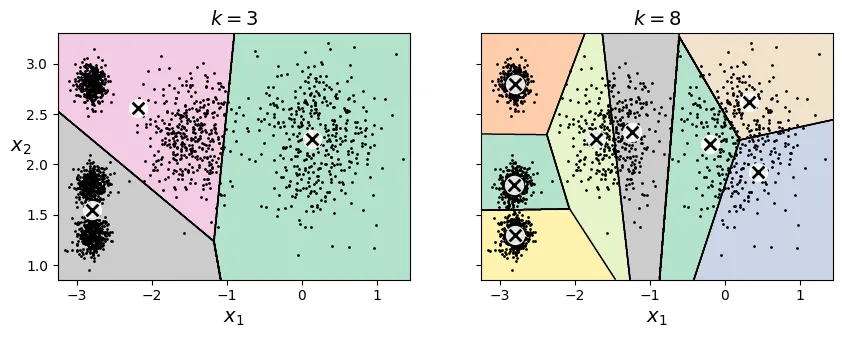
Chúng ta không thể chỉ dựa vào việc giảm thiểu Inertia để chọn , vì Inertia sẽ luôn giảm khi tăng (càng nhiều cụm, các điểm càng gần tâm cụm của nó).
Một phương pháp phổ biến là Quy tắc Khuỷu tay (Elbow Rule): Vẽ biểu đồ Inertia theo và tìm điểm gập khúc (như khuỷu tay), nơi mà việc tăng không còn làm giảm Inertia đáng kể nữa.
# extra code – tạo hình 8–8 biểu đồ Inertia
kmeans_per_k = [KMeans(n_clusters=k, random_state=43).fit(X)
for k in range(1, 10)]
inertias = [model.inertia_ for model in kmeans_per_k]
plt.figure(figsize=(8, 3.5))
plt.plot(range(1, 10), inertias, "bo-")
plt.xlabel("$k$")
plt.ylabel("Inertia")
plt.annotate("", xy=(4, inertias[3]), xytext=(4.45, 650),
arrowprops=dict(facecolor='black', shrink=0.1))
plt.text(4.5, 650, "Elbow", horizontalalignment="center")
plt.axis([1, 8.5, 0, 1300])
plt.grid()
plt.show()
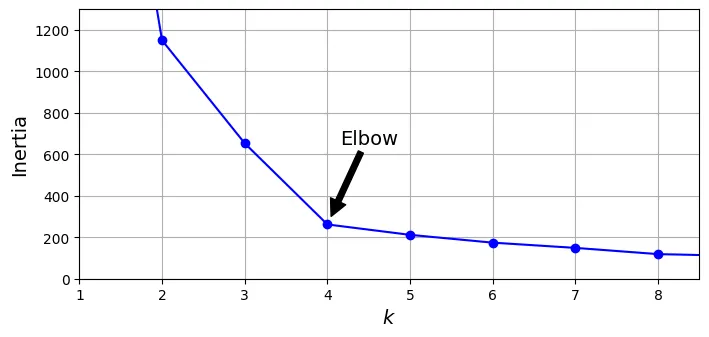
Tại , ta thấy một “khuỷu tay”. Điều này cho thấy hoặc là lựa chọn hợp lý.
Điểm số Dáng điệu (Silhouette Score)
Một phương pháp chính xác hơn là sử dụng Hệ số Dáng điệu (Silhouette Coefficient). Hệ số này đo lường mức độ giống nhau của một điểm với cụm của nó so với các cụm khác.
- Giá trị gần +1: Điểm nằm gọn trong cụm của nó và xa các cụm khác (tốt).
- Giá trị gần 0: Điểm nằm ở biên giới giữa các cụm.
- Giá trị gần -1: Điểm có thể đã bị gán nhầm cụm.
Silhouette Score là trung bình của hệ số này trên toàn bộ dữ liệu.
from sklearn.metrics import silhouette_score
silhouette_score(X, kmeans.labels_)
0.655517642572828
Hãy vẽ biểu đồ Silhouette Score theo . Giá trị cao nhất sẽ là tốt nhất.
# extra code – tạo hình 8–9
silhouette_scores = [silhouette_score(X, model.labels_)
for model in kmeans_per_k[1:]]
plt.figure(figsize=(8, 3))
plt.plot(range(2, 10), silhouette_scores, "bo-")
plt.xlabel("$k$")
plt.ylabel("Silhouette score")
plt.axis([1.8, 8.5, 0.55, 0.7])
plt.grid()
plt.show()
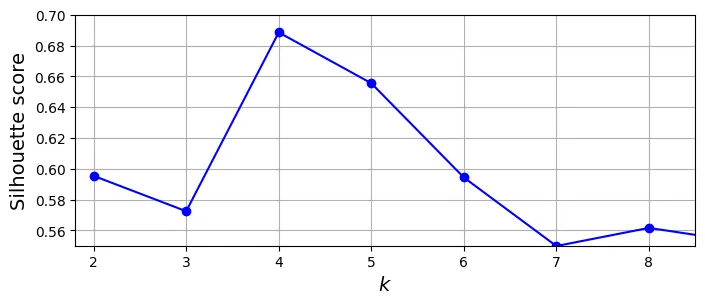
Biểu đồ cho thấy và đều rất tốt. Để phân tích sâu hơn, ta dùng Biểu đồ Dáng điệu (Silhouette Diagram).
Trong biểu đồ này, mỗi cụm được biểu diễn bằng hình dạng con dao. Chiều rộng biểu thị số lượng mẫu, chiều dài biểu thị hệ số silhouette. Đường nét đứt màu đỏ là điểm số trung bình.
- Nếu hầu hết các mẫu trong cụm đều vượt qua đường đỏ: Cụm tốt.
- Nếu các cụm có kích thước đồng đều: Phân cụm cân bằng.
# extra code – tạo hình 8–10 (Silhouette Diagram)
from sklearn.metrics import silhouette_samples
from matplotlib.ticker import FixedLocator, FixedFormatter
plt.figure(figsize=(11, 9))
for k in (3, 4, 5, 6):
plt.subplot(2, 2, k - 2)
y_pred = kmeans_per_k[k - 1].labels_
silhouette_coefficients = silhouette_samples(X, y_pred)
padding = len(X) // 30
pos = padding
ticks = []
for i in range(k):
coeffs = silhouette_coefficients[y_pred == i]
coeffs.sort()
color = plt.cm.Spectral(i / k)
plt.fill_betweenx(np.arange(pos, pos + len(coeffs)), 0, coeffs,
facecolor=color, edgecolor=color, alpha=0.7)
ticks.append(pos + len(coeffs) // 2)
pos += len(coeffs) + padding
plt.gca().yaxis.set_major_locator(FixedLocator(ticks))
plt.gca().yaxis.set_major_formatter(FixedFormatter(range(k)))
if k in (3, 5):
plt.ylabel("Cluster")
if k in (5, 6):
plt.gca().set_xticks([-0.1, 0, 0.2, 0.4, 0.6, 0.8, 1])
plt.xlabel("Silhouette Coefficient")
else:
plt.tick_params(labelbottom=False)
plt.axvline(x=silhouette_scores[k - 2], color="red", linestyle="--")
plt.title(f"$k={k}$")
plt.show()

Nhìn vào biểu đồ, tại , các cụm có kích thước tương đối đều nhau và hầu hết các điểm đều vượt qua ngưỡng trung bình. Đây là lựa chọn tốt nhất.
Hạn chế của K-Means
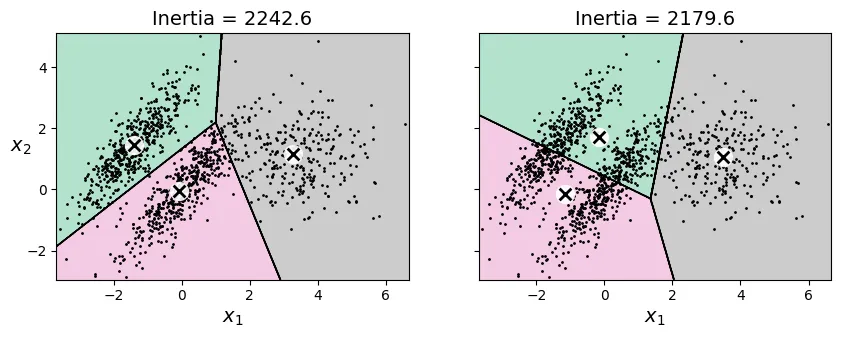
K-Means hoạt động tốt nhất trên các cụm hình cầu, có kích thước và mật độ tương đương nhau. Khi các cụm có hình dạng méo mó (elongated), mật độ khác nhau, hoặc kích thước chênh lệch, K-Means thường thất bại.
# extra code – tạo hình 8–11 minh họa hạn chế của K-Means
X1, y1 = make_blobs(n_samples=1000, centers=((4, -4), (0, 0)), random_state=42)
X1 = X1.dot(np.array([[0.374, 0.95], [0.732, 0.598]]))
X2, y2 = make_blobs(n_samples=250, centers=1, random_state=42)
X2 = X2 + [6, -8]
X = np.r_[X1, X2]
y = np.r_[y1, y2]
kmeans_good = KMeans(n_clusters=3,
init=np.array([[-1.5, 2.5], [0.5, 0], [4, 0]]),
random_state=42)
kmeans_bad = KMeans(n_clusters=3, n_init=10, random_state=42)
kmeans_good.fit(X)
kmeans_bad.fit(X)
plt.figure(figsize=(10, 3.2))
plt.subplot(121)
plot_decision_boundaries(kmeans_good, X)
plt.title(f"Inertia = {kmeans_good.inertia_:.1f}")
plt.subplot(122)
plot_decision_boundaries(kmeans_bad, X, show_ylabels=False)
plt.title(f"Inertia = {kmeans_bad.inertia_:.1f}")
plt.show()
2. Ứng dụng: Phân đoạn Ảnh (Image Segmentation)
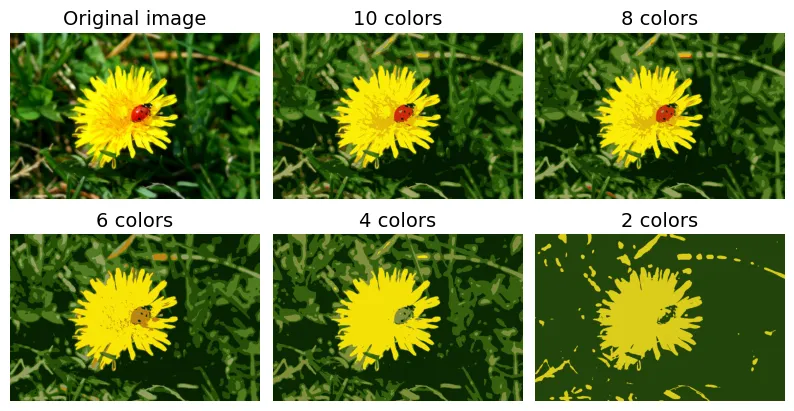
Một ứng dụng thú vị của K-Means là phân đoạn ảnh, cụ thể là lượng tử hóa màu (color quantization). Chúng ta sẽ giảm số lượng màu trong ảnh xuống còn màu, bằng cách gôm nhóm các pixel có màu sắc tương tự nhau.
# extra code – tải ảnh con bọ rùa (ladybug)
from pathlib import Path
import urllib.request
homlp_root = "https://github.com/ageron/handson-mlp/raw/main/"
filename = "ladybug.png"
filepath = Path(f"my_{filename}")
if not filepath.is_file():
print("Downloading", filename)
url = f"{homlp_root}/images/unsupervised_learning/{filename}"
urllib.request.urlretrieve(url, filepath)
import PIL
image = np.asarray(PIL.Image.open(filepath))
image.shape
(533, 800, 3)
Mỗi pixel là một điểm dữ liệu 3 chiều (Red, Green, Blue). Chúng ta sẽ dùng K-Means để tìm ra 8 màu chủ đạo và thay thế toàn bộ pixel trong ảnh bằng màu của tâm cụm gần nhất.
X = image.reshape(-1, 3)
kmeans = KMeans(n_clusters=8, random_state=42).fit(X)
segmented_img = kmeans.cluster_centers_[kmeans.labels_]
segmented_img = segmented_img.reshape(image.shape)
# extra code – tạo hình 8–12 so sánh số lượng màu khác nhau
segmented_imgs = []
n_colors = (10, 8, 6, 4, 2)
for n_clusters in n_colors:
kmeans = KMeans(n_clusters=n_clusters, random_state=42).fit(X)
segmented_img = kmeans.cluster_centers_[kmeans.labels_]
segmented_imgs.append(segmented_img.reshape(image.shape))
plt.figure(figsize=(10, 5))
plt.subplots_adjust(wspace=0.05, hspace=0.1)
plt.subplot(2, 3, 1)
plt.imshow(image)
plt.title("Original image")
plt.axis('off')
for idx, n_clusters in enumerate(n_colors):
plt.subplot(2, 3, 2 + idx)
plt.imshow(segmented_imgs[idx] / 255)
plt.title(f"{n_clusters} colors")
plt.axis('off')
plt.show()
3. Ứng dụng: Học Bán Giám Sát (Semi-Supervised Learning)
Giả sử chúng ta có bộ dữ liệu số viết tay (Digits), nhưng chỉ có rất ít nhãn. Làm thế nào để đạt độ chính xác cao?
Đầu tiên, tải dữ liệu và chia tập train/test:
from sklearn.datasets import load_digits
X_digits, y_digits = load_digits(return_X_y=True)
X_train, y_train = X_digits[:1400], y_digits[:1400]
X_test, y_test = X_digits[1400:], y_digits[1400:]
Nếu chỉ huấn luyện mô hình (ví dụ: Logistic Regression) trên 50 mẫu dữ liệu được gán nhãn ngẫu nhiên, độ chính xác sẽ khá thấp.
from sklearn.linear_model import LogisticRegression
n_labeled = 50
log_reg = LogisticRegression(max_iter=10_000)
log_reg.fit(X_train[:n_labeled], y_train[:n_labeled])
LogisticRegression(max_iter=10000)
Parameters
<tr class="default">
<td><i class="copy-paste-icon"
onclick="copyToClipboard('penalty',
this.parentElement.nextElementSibling)"
></i></td>
<td class="param">
<a class="param-doc-link"
rel="noreferrer" target="_blank" href="https://scikit-learn.org/1.8/modules/generated/sklearn.linear_model.LogisticRegression.html#:~:text=penalty,-%7B%27l1%27%2C%20%27l2%27%2C%20%27elasticnet%27%2C%20None%7D%2C%20default%3D%27l2%27">
penalty
<span class="param-doc-description">penalty: {'l1', 'l2', 'elasticnet', None}, default='l2'<br><br>Specify the norm of the penalty:<br><br>- `None`: no penalty is added;<br>- `'l2'`: add a L2 penalty term and it is the default choice;<br>- `'l1'`: add a L1 penalty term;<br>- `'elasticnet'`: both L1 and L2 penalty terms are added.<br><br>.. warning::<br> Some penalties may not work with some solvers. See the parameter<br> `solver` below, to know the compatibility between the penalty and<br> solver.<br><br>.. versionadded:: 0.19<br> l1 penalty with SAGA solver (allowing 'multinomial' + L1)<br><br>.. deprecated:: 1.8<br> `penalty` was deprecated in version 1.8 and will be removed in 1.10.<br> Use `l1_ratio` instead. `l1_ratio=0` for `penalty='l2'`, `l1_ratio=1` for<br> `penalty='l1'` and `l1_ratio` set to any float between 0 and 1 for<br> `'penalty='elasticnet'`.</span>
</a>
</td>
<td class="value">'deprecated'</td>
</tr>
<tr class="default">
<td><i class="copy-paste-icon"
onclick="copyToClipboard('C',
this.parentElement.nextElementSibling)"
></i></td>
<td class="param">
<a class="param-doc-link"
rel="noreferrer" target="_blank" href="https://scikit-learn.org/1.8/modules/generated/sklearn.linear_model.LogisticRegression.html#:~:text=C,-float%2C%20default%3D1.0">
C
<span class="param-doc-description">C: float, default=1.0<br><br>Inverse of regularization strength; must be a positive float.<br>Like in support vector machines, smaller values specify stronger<br>regularization. `C=np.inf` results in unpenalized logistic regression.<br>For a visual example on the effect of tuning the `C` parameter<br>with an L1 penalty, see:<br>:ref:`sphx_glr_auto_examples_linear_model_plot_logistic_path.py`.</span>
</a>
</td>
<td class="value">1.0</td>
</tr>
<tr class="default">
<td><i class="copy-paste-icon"
onclick="copyToClipboard('l1_ratio',
this.parentElement.nextElementSibling)"
></i></td>
<td class="param">
<a class="param-doc-link"
rel="noreferrer" target="_blank" href="https://scikit-learn.org/1.8/modules/generated/sklearn.linear_model.LogisticRegression.html#:~:text=l1_ratio,-float%2C%20default%3D0.0">
l1_ratio
<span class="param-doc-description">l1_ratio: float, default=0.0<br><br>The Elastic-Net mixing parameter, with `0 <= l1_ratio <= 1`. Setting<br>`l1_ratio=1` gives a pure L1-penalty, setting `l1_ratio=0` a pure L2-penalty.<br>Any value between 0 and 1 gives an Elastic-Net penalty of the form<br>`l1_ratio * L1 + (1 - l1_ratio) * L2`.<br><br>.. warning::<br> Certain values of `l1_ratio`, i.e. some penalties, may not work with some<br> solvers. See the parameter `solver` below, to know the compatibility between<br> the penalty and solver.<br><br>.. versionchanged:: 1.8<br> Default value changed from None to 0.0.<br><br>.. deprecated:: 1.8<br> `None` is deprecated and will be removed in version 1.10. Always use<br> `l1_ratio` to specify the penalty type.</span>
</a>
</td>
<td class="value">0.0</td>
</tr>
<tr class="default">
<td><i class="copy-paste-icon"
onclick="copyToClipboard('dual',
this.parentElement.nextElementSibling)"
></i></td>
<td class="param">
<a class="param-doc-link"
rel="noreferrer" target="_blank" href="https://scikit-learn.org/1.8/modules/generated/sklearn.linear_model.LogisticRegression.html#:~:text=dual,-bool%2C%20default%3DFalse">
dual
<span class="param-doc-description">dual: bool, default=False<br><br>Dual (constrained) or primal (regularized, see also<br>:ref:`this equation <regularized-logistic-loss>`) formulation. Dual formulation<br>is only implemented for l2 penalty with liblinear solver. Prefer `dual=False`<br>when n_samples > n_features.</span>
</a>
</td>
<td class="value">False</td>
</tr>
<tr class="default">
<td><i class="copy-paste-icon"
onclick="copyToClipboard('tol',
this.parentElement.nextElementSibling)"
></i></td>
<td class="param">
<a class="param-doc-link"
rel="noreferrer" target="_blank" href="https://scikit-learn.org/1.8/modules/generated/sklearn.linear_model.LogisticRegression.html#:~:text=tol,-float%2C%20default%3D1e-4">
tol
<span class="param-doc-description">tol: float, default=1e-4<br><br>Tolerance for stopping criteria.</span>
</a>
</td>
<td class="value">0.0001</td>
</tr>
<tr class="default">
<td><i class="copy-paste-icon"
onclick="copyToClipboard('fit_intercept',
this.parentElement.nextElementSibling)"
></i></td>
<td class="param">
<a class="param-doc-link"
rel="noreferrer" target="_blank" href="https://scikit-learn.org/1.8/modules/generated/sklearn.linear_model.LogisticRegression.html#:~:text=fit_intercept,-bool%2C%20default%3DTrue">
fit_intercept
<span class="param-doc-description">fit_intercept: bool, default=True<br><br>Specifies if a constant (a.k.a. bias or intercept) should be<br>added to the decision function.</span>
</a>
</td>
<td class="value">True</td>
</tr>
<tr class="default">
<td><i class="copy-paste-icon"
onclick="copyToClipboard('intercept_scaling',
this.parentElement.nextElementSibling)"
></i></td>
<td class="param">
<a class="param-doc-link"
rel="noreferrer" target="_blank" href="https://scikit-learn.org/1.8/modules/generated/sklearn.linear_model.LogisticRegression.html#:~:text=intercept_scaling,-float%2C%20default%3D1">
intercept_scaling
<span class="param-doc-description">intercept_scaling: float, default=1<br><br>Useful only when the solver `liblinear` is used<br>and `self.fit_intercept` is set to `True`. In this case, `x` becomes<br>`[x, self.intercept_scaling]`,<br>i.e. a "synthetic" feature with constant value equal to<br>`intercept_scaling` is appended to the instance vector.<br>The intercept becomes<br>``intercept_scaling * synthetic_feature_weight``.<br><br>.. note::<br> The synthetic feature weight is subject to L1 or L2<br> regularization as all other features.<br> To lessen the effect of regularization on synthetic feature weight<br> (and therefore on the intercept) `intercept_scaling` has to be increased.</span>
</a>
</td>
<td class="value">1</td>
</tr>
<tr class="default">
<td><i class="copy-paste-icon"
onclick="copyToClipboard('class_weight',
this.parentElement.nextElementSibling)"
></i></td>
<td class="param">
<a class="param-doc-link"
rel="noreferrer" target="_blank" href="https://scikit-learn.org/1.8/modules/generated/sklearn.linear_model.LogisticRegression.html#:~:text=class_weight,-dict%20or%20%27balanced%27%2C%20default%3DNone">
class_weight
<span class="param-doc-description">class_weight: dict or 'balanced', default=None<br><br>Weights associated with classes in the form ``{class_label: weight}``.<br>If not given, all classes are supposed to have weight one.<br><br>The "balanced" mode uses the values of y to automatically adjust<br>weights inversely proportional to class frequencies in the input data<br>as ``n_samples / (n_classes * np.bincount(y))``.<br><br>Note that these weights will be multiplied with sample_weight (passed<br>through the fit method) if sample_weight is specified.<br><br>.. versionadded:: 0.17<br> *class_weight='balanced'*</span>
</a>
</td>
<td class="value">None</td>
</tr>
<tr class="default">
<td><i class="copy-paste-icon"
onclick="copyToClipboard('random_state',
this.parentElement.nextElementSibling)"
></i></td>
<td class="param">
<a class="param-doc-link"
rel="noreferrer" target="_blank" href="https://scikit-learn.org/1.8/modules/generated/sklearn.linear_model.LogisticRegression.html#:~:text=random_state,-int%2C%20RandomState%20instance%2C%20default%3DNone">
random_state
<span class="param-doc-description">random_state: int, RandomState instance, default=None<br><br>Used when ``solver`` == 'sag', 'saga' or 'liblinear' to shuffle the<br>data. See :term:`Glossary <random_state>` for details.</span>
</a>
</td>
<td class="value">None</td>
</tr>
<tr class="default">
<td><i class="copy-paste-icon"
onclick="copyToClipboard('solver',
this.parentElement.nextElementSibling)"
></i></td>
<td class="param">
<a class="param-doc-link"
rel="noreferrer" target="_blank" href="https://scikit-learn.org/1.8/modules/generated/sklearn.linear_model.LogisticRegression.html#:~:text=solver,-%7B%27lbfgs%27%2C%20%27liblinear%27%2C%20%27newton-cg%27%2C%20%27newton-cholesky%27%2C%20%27sag%27%2C%20%27saga%27%7D%2C%20%20%20%20%20%20%20%20%20%20%20%20%20default%3D%27lbfgs%27">
solver
<span class="param-doc-description">solver: {'lbfgs', 'liblinear', 'newton-cg', 'newton-cholesky', 'sag', 'saga'}, default='lbfgs'<br><br>Algorithm to use in the optimization problem. Default is 'lbfgs'.<br>To choose a solver, you might want to consider the following aspects:<br><br>- 'lbfgs' is a good default solver because it works reasonably well for a wide<br> class of problems.<br>- For :term:`multiclass` problems (`n_classes >= 3`), all solvers except<br> 'liblinear' minimize the full multinomial loss, 'liblinear' will raise an<br> error.<br>- 'newton-cholesky' is a good choice for<br> `n_samples` >> `n_features * n_classes`, especially with one-hot encoded<br> categorical features with rare categories. Be aware that the memory usage<br> of this solver has a quadratic dependency on `n_features * n_classes`<br> because it explicitly computes the full Hessian matrix.<br>- For small datasets, 'liblinear' is a good choice, whereas 'sag'<br> and 'saga' are faster for large ones;<br>- 'liblinear' can only handle binary classification by default. To apply a<br> one-versus-rest scheme for the multiclass setting one can wrap it with the<br> :class:`~sklearn.multiclass.OneVsRestClassifier`.<br><br>.. warning::<br> The choice of the algorithm depends on the penalty chosen (`l1_ratio=0`<br> for L2-penalty, `l1_ratio=1` for L1-penalty and `0 < l1_ratio < 1` for<br> Elastic-Net) and on (multinomial) multiclass support:<br><br> ================= ======================== ======================<br> solver l1_ratio multinomial multiclass<br> ================= ======================== ======================<br> 'lbfgs' l1_ratio=0 yes<br> 'liblinear' l1_ratio=1 or l1_ratio=0 no<br> 'newton-cg' l1_ratio=0 yes<br> 'newton-cholesky' l1_ratio=0 yes<br> 'sag' l1_ratio=0 yes<br> 'saga' 0<=l1_ratio<=1 yes<br> ================= ======================== ======================<br><br>.. note::<br> 'sag' and 'saga' fast convergence is only guaranteed on features<br> with approximately the same scale. You can preprocess the data with<br> a scaler from :mod:`sklearn.preprocessing`.<br><br>.. seealso::<br> Refer to the :ref:`User Guide <Logistic_regression>` for more<br> information regarding :class:`LogisticRegression` and more specifically the<br> :ref:`Table <logistic_regression_solvers>`<br> summarizing solver/penalty supports.<br><br>.. versionadded:: 0.17<br> Stochastic Average Gradient (SAG) descent solver. Multinomial support in<br> version 0.18.<br>.. versionadded:: 0.19<br> SAGA solver.<br>.. versionchanged:: 0.22<br> The default solver changed from 'liblinear' to 'lbfgs' in 0.22.<br>.. versionadded:: 1.2<br> newton-cholesky solver. Multinomial support in version 1.6.</span>
</a>
</td>
<td class="value">'lbfgs'</td>
</tr>
<tr class="user-set">
<td><i class="copy-paste-icon"
onclick="copyToClipboard('max_iter',
this.parentElement.nextElementSibling)"
></i></td>
<td class="param">
<a class="param-doc-link"
rel="noreferrer" target="_blank" href="https://scikit-learn.org/1.8/modules/generated/sklearn.linear_model.LogisticRegression.html#:~:text=max_iter,-int%2C%20default%3D100">
max_iter
<span class="param-doc-description">max_iter: int, default=100<br><br>Maximum number of iterations taken for the solvers to converge.</span>
</a>
</td>
<td class="value">10000</td>
</tr>
<tr class="default">
<td><i class="copy-paste-icon"
onclick="copyToClipboard('verbose',
this.parentElement.nextElementSibling)"
></i></td>
<td class="param">
<a class="param-doc-link"
rel="noreferrer" target="_blank" href="https://scikit-learn.org/1.8/modules/generated/sklearn.linear_model.LogisticRegression.html#:~:text=verbose,-int%2C%20default%3D0">
verbose
<span class="param-doc-description">verbose: int, default=0<br><br>For the liblinear and lbfgs solvers set verbose to any positive<br>number for verbosity.</span>
</a>
</td>
<td class="value">0</td>
</tr>
<tr class="default">
<td><i class="copy-paste-icon"
onclick="copyToClipboard('warm_start',
this.parentElement.nextElementSibling)"
></i></td>
<td class="param">
<a class="param-doc-link"
rel="noreferrer" target="_blank" href="https://scikit-learn.org/1.8/modules/generated/sklearn.linear_model.LogisticRegression.html#:~:text=warm_start,-bool%2C%20default%3DFalse">
warm_start
<span class="param-doc-description">warm_start: bool, default=False<br><br>When set to True, reuse the solution of the previous call to fit as<br>initialization, otherwise, just erase the previous solution.<br>Useless for liblinear solver. See :term:`the Glossary <warm_start>`.<br><br>.. versionadded:: 0.17<br> *warm_start* to support *lbfgs*, *newton-cg*, *sag*, *saga* solvers.</span>
</a>
</td>
<td class="value">False</td>
</tr>
<tr class="default">
<td><i class="copy-paste-icon"
onclick="copyToClipboard('n_jobs',
this.parentElement.nextElementSibling)"
></i></td>
<td class="param">
<a class="param-doc-link"
rel="noreferrer" target="_blank" href="https://scikit-learn.org/1.8/modules/generated/sklearn.linear_model.LogisticRegression.html#:~:text=n_jobs,-int%2C%20default%3DNone">
n_jobs
<span class="param-doc-description">n_jobs: int, default=None<br><br>Does not have any effect.<br><br>.. deprecated:: 1.8<br> `n_jobs` is deprecated in version 1.8 and will be removed in 1.10.</span>
</a>
</td>
<td class="value">None</td>
</tr>
</tbody>
</table>
</details>
</div>
</div></div></div></div></div></body>
log_reg.score(X_test, y_test)
0.7581863979848866
So với việc huấn luyện trên toàn bộ dữ liệu (để tham chiếu):
# extra code – độ chính xác khi dùng toàn bộ dữ liệu
log_reg_full = LogisticRegression(max_iter=10_000)
log_reg_full.fit(X_train, y_train)
log_reg_full.score(X_test, y_test)
0.9093198992443325
Cải thiện bằng cách chọn mẫu đại diện
Thay vì chọn 50 mẫu ngẫu nhiên, chúng ta sẽ phân cụm dữ liệu thành 50 cụm, sau đó tìm ảnh đại diện (representative image) của mỗi cụm (ảnh gần tâm cụm nhất). Việc gán nhãn cho 50 ảnh đại diện này sẽ mang lại nhiều thông tin hơn.
k = 50
kmeans = KMeans(n_clusters=k, random_state=42)
X_digits_dist = kmeans.fit_transform(X_train)
representative_digit_idx = X_digits_dist.argmin(axis=0)
X_representative_digits = X_train[representative_digit_idx]
# extra code – hiển thị 50 ảnh đại diện của các cụm
plt.figure(figsize=(8, 2))
for index, X_representative_digit in enumerate(X_representative_digits):
plt.subplot(k // 10, 10, index + 1)
plt.imshow(X_representative_digit.reshape(8, 8), cmap="binary",
interpolation="bilinear")
plt.axis('off')
plt.show()

Tiếp theo, ta giả lập việc gán nhãn thủ công cho 50 ảnh này:
y_representative_digits = np.array([
8, 0, 1, 3, 6, 7, 5, 4, 2, 8,
2, 3, 9, 5, 3, 9, 1, 7, 9, 1,
4, 6, 9, 7, 5, 2, 2, 1, 3, 3,
6, 0, 4, 9, 8, 1, 8, 4, 2, 4,
2, 3, 9, 7, 8, 9, 6, 5, 6, 4,])
Bây giờ hãy huấn luyện lại mô hình với 50 mẫu đại diện này:
log_reg = LogisticRegression(max_iter=10_000)
log_reg.fit(X_representative_digits, y_representative_digits)
log_reg.score(X_test, y_test)
0.8337531486146096
Độ chính xác tăng vọt! Từ khoảng 75.8% lên 83.4%. Điều này cho thấy chọn mẫu thông minh (dựa trên phân cụm) tốt hơn chọn ngẫu nhiên.
Lan truyền nhãn (Label Propagation)
Chúng ta có thể làm tốt hơn nữa bằng cách lan truyền nhãn của mẫu đại diện cho tất cả các mẫu khác trong cùng cụm đó.
y_train_propagated = np.empty(len(X_train), dtype=np.int64)
for i in range(k):
y_train_propagated[kmeans.labels_ == i] = y_representative_digits[i]
log_reg = LogisticRegression(max_iter=10_000)
log_reg.fit(X_train, y_train_propagated)
log_reg.score(X_test, y_test)
0.8690176322418136
Kết quả tiếp tục tăng! Tuy nhiên, việc lan truyền nhãn cho các điểm ở rìa cụm (xa tâm) có thể gây nhiễu. Hãy thử chỉ lan truyền cho 50% các điểm gần tâm nhất.
percentile_closest = 50
X_cluster_dist = X_digits_dist[np.arange(len(X_train)), kmeans.labels_]
for i in range(k):
in_cluster = (kmeans.labels_ == i)
cluster_dist = X_cluster_dist[in_cluster]
cutoff_distance = np.percentile(cluster_dist, percentile_closest)
above_cutoff = (X_cluster_dist > cutoff_distance)
X_cluster_dist[in_cluster & above_cutoff] = -1
partially_propagated = (X_cluster_dist != -1)
X_train_partially_propagated = X_train[partially_propagated]
y_train_partially_propagated = y_train_propagated[partially_propagated]
log_reg = LogisticRegression(max_iter=10_000)
log_reg.fit(X_train_partially_propagated, y_train_partially_propagated)
log_reg.score(X_test, y_test)
0.8841309823677582
Độ chính xác đạt mức rất ấn tượng (~88.4%) chỉ với 50 nhãn gốc ban đầu! Chúng ta cũng có thể kiểm tra xem các nhãn được lan truyền có chính xác không:
(y_train_partially_propagated == y_train[partially_propagated]).mean()
np.float64(0.9887798036465638)
4. DBSCAN
DBSCAN (Density-Based Spatial Clustering of Applications with Noise) là một thuật toán phân cụm dựa trên mật độ. Nó định nghĩa cụm là các vùng có mật độ điểm cao, được ngăn cách bởi các vùng có mật độ thấp.
DBSCAN có hai tham số chính:
eps(epsilon): Bán kính vùng lân cận.min_samples: Số lượng điểm tối thiểu trong vùng bán kínhepsđể một điểm được coi là điểm lõi (core point).
from sklearn.cluster import DBSCAN
from sklearn.datasets import make_moons
X, y = make_moons(n_samples=1000, noise=0.05, random_state=42)
dbscan = DBSCAN(eps=0.05, min_samples=5)
dbscan.fit(X)
DBSCAN(eps=0.05)
Parameters
<tr class="user-set">
<td><i class="copy-paste-icon"
onclick="copyToClipboard('eps',
this.parentElement.nextElementSibling)"
></i></td>
<td class="param">
<a class="param-doc-link"
rel="noreferrer" target="_blank" href="https://scikit-learn.org/1.8/modules/generated/sklearn.cluster.DBSCAN.html#:~:text=eps,-float%2C%20default%3D0.5">
eps
<span class="param-doc-description">eps: float, default=0.5<br><br>The maximum distance between two samples for one to be considered<br>as in the neighborhood of the other. This is not a maximum bound<br>on the distances of points within a cluster. This is the most<br>important DBSCAN parameter to choose appropriately for your data set<br>and distance function. Smaller values generally lead to more clusters.</span>
</a>
</td>
<td class="value">0.05</td>
</tr>
<tr class="default">
<td><i class="copy-paste-icon"
onclick="copyToClipboard('min_samples',
this.parentElement.nextElementSibling)"
></i></td>
<td class="param">
<a class="param-doc-link"
rel="noreferrer" target="_blank" href="https://scikit-learn.org/1.8/modules/generated/sklearn.cluster.DBSCAN.html#:~:text=min_samples,-int%2C%20default%3D5">
min_samples
<span class="param-doc-description">min_samples: int, default=5<br><br>The number of samples (or total weight) in a neighborhood for a point to<br>be considered as a core point. This includes the point itself. If<br>`min_samples` is set to a higher value, DBSCAN will find denser clusters,<br>whereas if it is set to a lower value, the found clusters will be more<br>sparse.</span>
</a>
</td>
<td class="value">5</td>
</tr>
<tr class="default">
<td><i class="copy-paste-icon"
onclick="copyToClipboard('metric',
this.parentElement.nextElementSibling)"
></i></td>
<td class="param">
<a class="param-doc-link"
rel="noreferrer" target="_blank" href="https://scikit-learn.org/1.8/modules/generated/sklearn.cluster.DBSCAN.html#:~:text=metric,-str%2C%20or%20callable%2C%20default%3D%27euclidean%27">
metric
<span class="param-doc-description">metric: str, or callable, default='euclidean'<br><br>The metric to use when calculating distance between instances in a<br>feature array. If metric is a string or callable, it must be one of<br>the options allowed by :func:`sklearn.metrics.pairwise_distances` for<br>its metric parameter.<br>If metric is "precomputed", X is assumed to be a distance matrix and<br>must be square. X may be a :term:`sparse graph`, in which<br>case only "nonzero" elements may be considered neighbors for DBSCAN.<br><br>.. versionadded:: 0.17<br> metric *precomputed* to accept precomputed sparse matrix.</span>
</a>
</td>
<td class="value">'euclidean'</td>
</tr>
<tr class="default">
<td><i class="copy-paste-icon"
onclick="copyToClipboard('metric_params',
this.parentElement.nextElementSibling)"
></i></td>
<td class="param">
<a class="param-doc-link"
rel="noreferrer" target="_blank" href="https://scikit-learn.org/1.8/modules/generated/sklearn.cluster.DBSCAN.html#:~:text=metric_params,-dict%2C%20default%3DNone">
metric_params
<span class="param-doc-description">metric_params: dict, default=None<br><br>Additional keyword arguments for the metric function.<br><br>.. versionadded:: 0.19</span>
</a>
</td>
<td class="value">None</td>
</tr>
<tr class="default">
<td><i class="copy-paste-icon"
onclick="copyToClipboard('algorithm',
this.parentElement.nextElementSibling)"
></i></td>
<td class="param">
<a class="param-doc-link"
rel="noreferrer" target="_blank" href="https://scikit-learn.org/1.8/modules/generated/sklearn.cluster.DBSCAN.html#:~:text=algorithm,-%7B%27auto%27%2C%20%27ball_tree%27%2C%20%27kd_tree%27%2C%20%27brute%27%7D%2C%20default%3D%27auto%27">
algorithm
<span class="param-doc-description">algorithm: {'auto', 'ball_tree', 'kd_tree', 'brute'}, default='auto'<br><br>The algorithm to be used by the NearestNeighbors module<br>to compute pointwise distances and find nearest neighbors.<br>'auto' will attempt to decide the most appropriate algorithm<br>based on the values passed to :meth:`fit` method.<br>See :class:`~sklearn.neighbors.NearestNeighbors` documentation for<br>details.</span>
</a>
</td>
<td class="value">'auto'</td>
</tr>
<tr class="default">
<td><i class="copy-paste-icon"
onclick="copyToClipboard('leaf_size',
this.parentElement.nextElementSibling)"
></i></td>
<td class="param">
<a class="param-doc-link"
rel="noreferrer" target="_blank" href="https://scikit-learn.org/1.8/modules/generated/sklearn.cluster.DBSCAN.html#:~:text=leaf_size,-int%2C%20default%3D30">
leaf_size
<span class="param-doc-description">leaf_size: int, default=30<br><br>Leaf size passed to BallTree or cKDTree. This can affect the speed<br>of the construction and query, as well as the memory required<br>to store the tree. The optimal value depends<br>on the nature of the problem.</span>
</a>
</td>
<td class="value">30</td>
</tr>
<tr class="default">
<td><i class="copy-paste-icon"
onclick="copyToClipboard('p',
this.parentElement.nextElementSibling)"
></i></td>
<td class="param">
<a class="param-doc-link"
rel="noreferrer" target="_blank" href="https://scikit-learn.org/1.8/modules/generated/sklearn.cluster.DBSCAN.html#:~:text=p,-float%2C%20default%3DNone">
p
<span class="param-doc-description">p: float, default=None<br><br>The power of the Minkowski metric to be used to calculate distance<br>between points. If None, then ``p=2`` (equivalent to the Euclidean<br>distance). When p=1, this is equivalent to Manhattan distance.</span>
</a>
</td>
<td class="value">None</td>
</tr>
<tr class="default">
<td><i class="copy-paste-icon"
onclick="copyToClipboard('n_jobs',
this.parentElement.nextElementSibling)"
></i></td>
<td class="param">
<a class="param-doc-link"
rel="noreferrer" target="_blank" href="https://scikit-learn.org/1.8/modules/generated/sklearn.cluster.DBSCAN.html#:~:text=n_jobs,-int%2C%20default%3DNone">
n_jobs
<span class="param-doc-description">n_jobs: int, default=None<br><br>The number of parallel jobs to run.<br>``None`` means 1 unless in a :obj:`joblib.parallel_backend` context.<br>``-1`` means using all processors. See :term:`Glossary <n_jobs>`<br>for more details.</span>
</a>
</td>
<td class="value">None</td>
</tr>
</tbody>
</table>
</details>
</div>
</div></div></div></div></div></body>
Nhãn -1 trong DBSCAN biểu thị các điểm nhiễu (outliers/anomalies) không thuộc cụm nào.
dbscan.labels_[:10]
array([ 0, 2, -1, -1, 1, 0, 0, 0, 2, 5])
# Các chỉ số của điểm lõi
dbscan.core_sample_indices_[:10]
array([ 0, 4, 5, 6, 7, 8, 10, 11, 12, 13])
# Tọa độ của các điểm lõi
dbscan.components_
array([[-0.02137124, 0.40618608],
[-0.84192557, 0.53058695],
[ 0.58930337, -0.32137599],
...,
[ 1.66258462, -0.3079193 ],
[-0.94355873, 0.3278936 ],
[ 0.79419406, 0.60777171]])
Hãy xem tác động của tham số eps.
- Bên trái (
eps=0.05): Bán kính quá nhỏ, nhiều điểm bị coi là nhiễu (dấu x đỏ). - Bên phải (
eps=0.2): Bán kính phù hợp, thuật toán tìm ra đúng hình dạng 2 nửa mặt trăng.
# extra code – hàm vẽ kết quả DBSCAN
def plot_dbscan(dbscan, X, size, show_xlabels=True, show_ylabels=True):
core_mask = np.zeros_like(dbscan.labels_, dtype=bool)
core_mask[dbscan.core_sample_indices_] = True
anomalies_mask = dbscan.labels_ == -1
non_core_mask = ~(core_mask | anomalies_mask)
cores = dbscan.components_
anomalies = X[anomalies_mask]
non_cores = X[non_core_mask]
plt.scatter(cores[:, 0], cores[:, 1],
c=dbscan.labels_[core_mask], marker='o', s=size, cmap="Paired")
plt.scatter(cores[:, 0], cores[:, 1], marker='*', s=20,
c=dbscan.labels_[core_mask])
plt.scatter(anomalies[:, 0], anomalies[:, 1],
c="r", marker="x", s=100)
plt.scatter(non_cores[:, 0], non_cores[:, 1],
c=dbscan.labels_[non_core_mask], marker=".")
if show_xlabels:
plt.xlabel("$x_1$")
else:
plt.tick_params(labelbottom=False)
if show_ylabels:
plt.ylabel("$x_2$", rotation=0)
else:
plt.tick_params(labelleft=False)
plt.title(f"eps={dbscan.eps:.2f}, min_samples={dbscan.min_samples}")
plt.grid()
plt.gca().set_axisbelow(True)
dbscan2 = DBSCAN(eps=0.2)
dbscan2.fit(X)
plt.figure(figsize=(9, 3.2))
plt.subplot(121)
plot_dbscan(dbscan, X, size=100)
plt.subplot(122)
plot_dbscan(dbscan2, X, size=600, show_ylabels=False)
plt.show()

DBSCAN không có phương thức predict() vì nó không khái quát hóa mô hình cho dữ liệu mới. Để phân loại điểm mới, chúng ta có thể dùng một thuật toán phân loại (như KNN) huấn luyện trên các điểm lõi mà DBSCAN tìm được.
dbscan = dbscan2 # sử dụng mô hình tốt hơn (eps=0.2)
from sklearn.neighbors import KNeighborsClassifier
knn = KNeighborsClassifier(n_neighbors=50)
# Huấn luyện KNN trên các điểm lõi
knn.fit(dbscan.components_, dbscan.labels_[dbscan.core_sample_indices_])
KNeighborsClassifier(n_neighbors=50)
Parameters
<tr class="user-set">
<td><i class="copy-paste-icon"
onclick="copyToClipboard('n_neighbors',
this.parentElement.nextElementSibling)"
></i></td>
<td class="param">
<a class="param-doc-link"
rel="noreferrer" target="_blank" href="https://scikit-learn.org/1.8/modules/generated/sklearn.neighbors.KNeighborsClassifier.html#:~:text=n_neighbors,-int%2C%20default%3D5">
n_neighbors
<span class="param-doc-description">n_neighbors: int, default=5<br><br>Number of neighbors to use by default for :meth:`kneighbors` queries.</span>
</a>
</td>
<td class="value">50</td>
</tr>
<tr class="default">
<td><i class="copy-paste-icon"
onclick="copyToClipboard('weights',
this.parentElement.nextElementSibling)"
></i></td>
<td class="param">
<a class="param-doc-link"
rel="noreferrer" target="_blank" href="https://scikit-learn.org/1.8/modules/generated/sklearn.neighbors.KNeighborsClassifier.html#:~:text=weights,-%7B%27uniform%27%2C%20%27distance%27%7D%2C%20callable%20or%20None%2C%20default%3D%27uniform%27">
weights
<span class="param-doc-description">weights: {'uniform', 'distance'}, callable or None, default='uniform'<br><br>Weight function used in prediction. Possible values:<br><br>- 'uniform' : uniform weights. All points in each neighborhood<br> are weighted equally.<br>- 'distance' : weight points by the inverse of their distance.<br> in this case, closer neighbors of a query point will have a<br> greater influence than neighbors which are further away.<br>- [callable] : a user-defined function which accepts an<br> array of distances, and returns an array of the same shape<br> containing the weights.<br><br>Refer to the example entitled<br>:ref:`sphx_glr_auto_examples_neighbors_plot_classification.py`<br>showing the impact of the `weights` parameter on the decision<br>boundary.</span>
</a>
</td>
<td class="value">'uniform'</td>
</tr>
<tr class="default">
<td><i class="copy-paste-icon"
onclick="copyToClipboard('algorithm',
this.parentElement.nextElementSibling)"
></i></td>
<td class="param">
<a class="param-doc-link"
rel="noreferrer" target="_blank" href="https://scikit-learn.org/1.8/modules/generated/sklearn.neighbors.KNeighborsClassifier.html#:~:text=algorithm,-%7B%27auto%27%2C%20%27ball_tree%27%2C%20%27kd_tree%27%2C%20%27brute%27%7D%2C%20default%3D%27auto%27">
algorithm
<span class="param-doc-description">algorithm: {'auto', 'ball_tree', 'kd_tree', 'brute'}, default='auto'<br><br>Algorithm used to compute the nearest neighbors:<br><br>- 'ball_tree' will use :class:`BallTree`<br>- 'kd_tree' will use :class:`KDTree`<br>- 'brute' will use a brute-force search.<br>- 'auto' will attempt to decide the most appropriate algorithm<br> based on the values passed to :meth:`fit` method.<br><br>Note: fitting on sparse input will override the setting of<br>this parameter, using brute force.</span>
</a>
</td>
<td class="value">'auto'</td>
</tr>
<tr class="default">
<td><i class="copy-paste-icon"
onclick="copyToClipboard('leaf_size',
this.parentElement.nextElementSibling)"
></i></td>
<td class="param">
<a class="param-doc-link"
rel="noreferrer" target="_blank" href="https://scikit-learn.org/1.8/modules/generated/sklearn.neighbors.KNeighborsClassifier.html#:~:text=leaf_size,-int%2C%20default%3D30">
leaf_size
<span class="param-doc-description">leaf_size: int, default=30<br><br>Leaf size passed to BallTree or KDTree. This can affect the<br>speed of the construction and query, as well as the memory<br>required to store the tree. The optimal value depends on the<br>nature of the problem.</span>
</a>
</td>
<td class="value">30</td>
</tr>
<tr class="default">
<td><i class="copy-paste-icon"
onclick="copyToClipboard('p',
this.parentElement.nextElementSibling)"
></i></td>
<td class="param">
<a class="param-doc-link"
rel="noreferrer" target="_blank" href="https://scikit-learn.org/1.8/modules/generated/sklearn.neighbors.KNeighborsClassifier.html#:~:text=p,-float%2C%20default%3D2">
p
<span class="param-doc-description">p: float, default=2<br><br>Power parameter for the Minkowski metric. When p = 1, this is equivalent<br>to using manhattan_distance (l1), and euclidean_distance (l2) for p = 2.<br>For arbitrary p, minkowski_distance (l_p) is used. This parameter is expected<br>to be positive.</span>
</a>
</td>
<td class="value">2</td>
</tr>
<tr class="default">
<td><i class="copy-paste-icon"
onclick="copyToClipboard('metric',
this.parentElement.nextElementSibling)"
></i></td>
<td class="param">
<a class="param-doc-link"
rel="noreferrer" target="_blank" href="https://scikit-learn.org/1.8/modules/generated/sklearn.neighbors.KNeighborsClassifier.html#:~:text=metric,-str%20or%20callable%2C%20default%3D%27minkowski%27">
metric
<span class="param-doc-description">metric: str or callable, default='minkowski'<br><br>Metric to use for distance computation. Default is "minkowski", which<br>results in the standard Euclidean distance when p = 2. See the<br>documentation of `scipy.spatial.distance<br><https://docs.scipy.org/doc/scipy/reference/spatial.distance.html>`_ and<br>the metrics listed in<br>:class:`~sklearn.metrics.pairwise.distance_metrics` for valid metric<br>values.<br><br>If metric is "precomputed", X is assumed to be a distance matrix and<br>must be square during fit. X may be a :term:`sparse graph`, in which<br>case only "nonzero" elements may be considered neighbors.<br><br>If metric is a callable function, it takes two arrays representing 1D<br>vectors as inputs and must return one value indicating the distance<br>between those vectors. This works for Scipy's metrics, but is less<br>efficient than passing the metric name as a string.</span>
</a>
</td>
<td class="value">'minkowski'</td>
</tr>
<tr class="default">
<td><i class="copy-paste-icon"
onclick="copyToClipboard('metric_params',
this.parentElement.nextElementSibling)"
></i></td>
<td class="param">
<a class="param-doc-link"
rel="noreferrer" target="_blank" href="https://scikit-learn.org/1.8/modules/generated/sklearn.neighbors.KNeighborsClassifier.html#:~:text=metric_params,-dict%2C%20default%3DNone">
metric_params
<span class="param-doc-description">metric_params: dict, default=None<br><br>Additional keyword arguments for the metric function.</span>
</a>
</td>
<td class="value">None</td>
</tr>
<tr class="default">
<td><i class="copy-paste-icon"
onclick="copyToClipboard('n_jobs',
this.parentElement.nextElementSibling)"
></i></td>
<td class="param">
<a class="param-doc-link"
rel="noreferrer" target="_blank" href="https://scikit-learn.org/1.8/modules/generated/sklearn.neighbors.KNeighborsClassifier.html#:~:text=n_jobs,-int%2C%20default%3DNone">
n_jobs
<span class="param-doc-description">n_jobs: int, default=None<br><br>The number of parallel jobs to run for neighbors search.<br>``None`` means 1 unless in a :obj:`joblib.parallel_backend` context.<br>``-1`` means using all processors. See :term:`Glossary <n_jobs>`<br>for more details.<br>Doesn't affect :meth:`fit` method.</span>
</a>
</td>
<td class="value">None</td>
</tr>
</tbody>
</table>
</details>
</div>
</div></div></div></div></div></body>
X_new = np.array([[-0.5, 0], [0, 0.5], [1, -0.1], [2, 1]])
knn.predict(X_new)
array([1, 0, 1, 0])
knn.predict_proba(X_new)
array([[0.18, 0.82],
[1. , 0. ],
[0.12, 0.88],
[1. , 0. ]])
# extra code – vẽ ranh giới quyết định của KNN dựa trên DBSCAN
plt.figure(figsize=(6, 3))
plot_decision_boundaries(knn, X, show_centroids=False)
plt.scatter(X_new[:, 0], X_new[:, 1], c="b", marker="+", s=200, zorder=10)
plt.show()
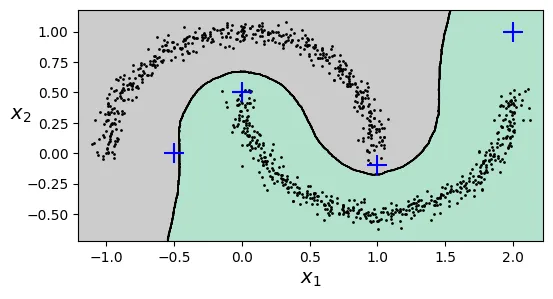
Chúng ta cũng có thể phát hiện bất thường bằng cách xem khoảng cách đến hàng xóm gần nhất. Nếu quá xa, đó là ngoại lai (outlier).
y_dist, y_pred_idx = knn.kneighbors(X_new, n_neighbors=1)
y_pred = dbscan.labels_[dbscan.core_sample_indices_][y_pred_idx]
y_pred[y_dist > 0.2] = -1
y_pred.ravel()
array([-1, 0, 1, -1])
5. Các thuật toán phân cụm khác
Phân cụm Phổ (Spectral Clustering)
Sử dụng ma trận tương đồng (similarity matrix) giữa các điểm và thực hiện giảm chiều dữ liệu trước khi phân cụm (thường dùng K-Means trong không gian mới).
from sklearn.cluster import SpectralClustering
sc1 = SpectralClustering(n_clusters=2, gamma=100, random_state=42)
sc1.fit(X)
sc2 = SpectralClustering(n_clusters=2, gamma=1, random_state=42)
sc2.fit(X)
SpectralClustering(gamma=1, n_clusters=2, random_state=42)
Parameters
<tr class="user-set">
<td><i class="copy-paste-icon"
onclick="copyToClipboard('n_clusters',
this.parentElement.nextElementSibling)"
></i></td>
<td class="param">
<a class="param-doc-link"
rel="noreferrer" target="_blank" href="https://scikit-learn.org/1.8/modules/generated/sklearn.cluster.SpectralClustering.html#:~:text=n_clusters,-int%2C%20default%3D8">
n_clusters
<span class="param-doc-description">n_clusters: int, default=8<br><br>The dimension of the projection subspace.</span>
</a>
</td>
<td class="value">2</td>
</tr>
<tr class="default">
<td><i class="copy-paste-icon"
onclick="copyToClipboard('eigen_solver',
this.parentElement.nextElementSibling)"
></i></td>
<td class="param">
<a class="param-doc-link"
rel="noreferrer" target="_blank" href="https://scikit-learn.org/1.8/modules/generated/sklearn.cluster.SpectralClustering.html#:~:text=eigen_solver,-%7B%27arpack%27%2C%20%27lobpcg%27%2C%20%27amg%27%7D%2C%20default%3DNone">
eigen_solver
<span class="param-doc-description">eigen_solver: {'arpack', 'lobpcg', 'amg'}, default=None<br><br>The eigenvalue decomposition strategy to use. AMG requires pyamg<br>to be installed. It can be faster on very large, sparse problems,<br>but may also lead to instabilities. If None, then ``'arpack'`` is<br>used. See [4]_ for more details regarding `'lobpcg'`.</span>
</a>
</td>
<td class="value">None</td>
</tr>
<tr class="default">
<td><i class="copy-paste-icon"
onclick="copyToClipboard('n_components',
this.parentElement.nextElementSibling)"
></i></td>
<td class="param">
<a class="param-doc-link"
rel="noreferrer" target="_blank" href="https://scikit-learn.org/1.8/modules/generated/sklearn.cluster.SpectralClustering.html#:~:text=n_components,-int%2C%20default%3DNone">
n_components
<span class="param-doc-description">n_components: int, default=None<br><br>Number of eigenvectors to use for the spectral embedding. If None,<br>defaults to `n_clusters`.</span>
</a>
</td>
<td class="value">None</td>
</tr>
<tr class="user-set">
<td><i class="copy-paste-icon"
onclick="copyToClipboard('random_state',
this.parentElement.nextElementSibling)"
></i></td>
<td class="param">
<a class="param-doc-link"
rel="noreferrer" target="_blank" href="https://scikit-learn.org/1.8/modules/generated/sklearn.cluster.SpectralClustering.html#:~:text=random_state,-int%2C%20RandomState%20instance%2C%20default%3DNone">
random_state
<span class="param-doc-description">random_state: int, RandomState instance, default=None<br><br>A pseudo random number generator used for the initialization<br>of the lobpcg eigenvectors decomposition when `eigen_solver ==<br>'amg'`, and for the K-Means initialization. Use an int to make<br>the results deterministic across calls (See<br>:term:`Glossary <random_state>`).<br><br>.. note::<br> When using `eigen_solver == 'amg'`,<br> it is necessary to also fix the global numpy seed with<br> `np.random.seed(int)` to get deterministic results. See<br> https://github.com/pyamg/pyamg/issues/139 for further<br> information.</span>
</a>
</td>
<td class="value">42</td>
</tr>
<tr class="default">
<td><i class="copy-paste-icon"
onclick="copyToClipboard('n_init',
this.parentElement.nextElementSibling)"
></i></td>
<td class="param">
<a class="param-doc-link"
rel="noreferrer" target="_blank" href="https://scikit-learn.org/1.8/modules/generated/sklearn.cluster.SpectralClustering.html#:~:text=n_init,-int%2C%20default%3D10">
n_init
<span class="param-doc-description">n_init: int, default=10<br><br>Number of time the k-means algorithm will be run with different<br>centroid seeds. The final results will be the best output of n_init<br>consecutive runs in terms of inertia. Only used if<br>``assign_labels='kmeans'``.</span>
</a>
</td>
<td class="value">10</td>
</tr>
<tr class="default">
<td><i class="copy-paste-icon"
onclick="copyToClipboard('gamma',
this.parentElement.nextElementSibling)"
></i></td>
<td class="param">
<a class="param-doc-link"
rel="noreferrer" target="_blank" href="https://scikit-learn.org/1.8/modules/generated/sklearn.cluster.SpectralClustering.html#:~:text=gamma,-float%2C%20default%3D1.0">
gamma
<span class="param-doc-description">gamma: float, default=1.0<br><br>Kernel coefficient for rbf, poly, sigmoid, laplacian and chi2 kernels.<br>Ignored for ``affinity='nearest_neighbors'``, ``affinity='precomputed'``<br>or ``affinity='precomputed_nearest_neighbors'``.</span>
</a>
</td>
<td class="value">1</td>
</tr>
<tr class="default">
<td><i class="copy-paste-icon"
onclick="copyToClipboard('affinity',
this.parentElement.nextElementSibling)"
></i></td>
<td class="param">
<a class="param-doc-link"
rel="noreferrer" target="_blank" href="https://scikit-learn.org/1.8/modules/generated/sklearn.cluster.SpectralClustering.html#:~:text=affinity,-str%20or%20callable%2C%20default%3D%27rbf%27">
affinity
<span class="param-doc-description">affinity: str or callable, default='rbf'<br><br>How to construct the affinity matrix.<br> - 'nearest_neighbors': construct the affinity matrix by computing a<br> graph of nearest neighbors.<br> - 'rbf': construct the affinity matrix using a radial basis function<br> (RBF) kernel.<br> - 'precomputed': interpret ``X`` as a precomputed affinity matrix,<br> where larger values indicate greater similarity between instances.<br> - 'precomputed_nearest_neighbors': interpret ``X`` as a sparse graph<br> of precomputed distances, and construct a binary affinity matrix<br> from the ``n_neighbors`` nearest neighbors of each instance.<br> - one of the kernels supported by<br> :func:`~sklearn.metrics.pairwise.pairwise_kernels`.<br><br>Only kernels that produce similarity scores (non-negative values that<br>increase with similarity) should be used. This property is not checked<br>by the clustering algorithm.</span>
</a>
</td>
<td class="value">'rbf'</td>
</tr>
<tr class="default">
<td><i class="copy-paste-icon"
onclick="copyToClipboard('n_neighbors',
this.parentElement.nextElementSibling)"
></i></td>
<td class="param">
<a class="param-doc-link"
rel="noreferrer" target="_blank" href="https://scikit-learn.org/1.8/modules/generated/sklearn.cluster.SpectralClustering.html#:~:text=n_neighbors,-int%2C%20default%3D10">
n_neighbors
<span class="param-doc-description">n_neighbors: int, default=10<br><br>Number of neighbors to use when constructing the affinity matrix using<br>the nearest neighbors method. Ignored for ``affinity='rbf'``.</span>
</a>
</td>
<td class="value">10</td>
</tr>
<tr class="default">
<td><i class="copy-paste-icon"
onclick="copyToClipboard('eigen_tol',
this.parentElement.nextElementSibling)"
></i></td>
<td class="param">
<a class="param-doc-link"
rel="noreferrer" target="_blank" href="https://scikit-learn.org/1.8/modules/generated/sklearn.cluster.SpectralClustering.html#:~:text=eigen_tol,-float%2C%20default%3D%22auto%22">
eigen_tol
<span class="param-doc-description">eigen_tol: float, default="auto"<br><br>Stopping criterion for eigen decomposition of the Laplacian matrix.<br>If `eigen_tol="auto"` then the passed tolerance will depend on the<br>`eigen_solver`:<br><br>- If `eigen_solver="arpack"`, then `eigen_tol=0.0`;<br>- If `eigen_solver="lobpcg"` or `eigen_solver="amg"`, then<br> `eigen_tol=None` which configures the underlying `lobpcg` solver to<br> automatically resolve the value according to their heuristics. See,<br> :func:`scipy.sparse.linalg.lobpcg` for details.<br><br>Note that when using `eigen_solver="lobpcg"` or `eigen_solver="amg"`<br>values of `tol<1e-5` may lead to convergence issues and should be<br>avoided.<br><br>.. versionadded:: 1.2<br> Added 'auto' option.</span>
</a>
</td>
<td class="value">'auto'</td>
</tr>
<tr class="default">
<td><i class="copy-paste-icon"
onclick="copyToClipboard('assign_labels',
this.parentElement.nextElementSibling)"
></i></td>
<td class="param">
<a class="param-doc-link"
rel="noreferrer" target="_blank" href="https://scikit-learn.org/1.8/modules/generated/sklearn.cluster.SpectralClustering.html#:~:text=assign_labels,-%7B%27kmeans%27%2C%20%27discretize%27%2C%20%27cluster_qr%27%7D%2C%20default%3D%27kmeans%27">
assign_labels
<span class="param-doc-description">assign_labels: {'kmeans', 'discretize', 'cluster_qr'}, default='kmeans'<br><br>The strategy for assigning labels in the embedding space. There are two<br>ways to assign labels after the Laplacian embedding. k-means is a<br>popular choice, but it can be sensitive to initialization.<br>Discretization is another approach which is less sensitive to random<br>initialization [3]_.<br>The cluster_qr method [5]_ directly extract clusters from eigenvectors<br>in spectral clustering. In contrast to k-means and discretization, cluster_qr<br>has no tuning parameters and runs no iterations, yet may outperform<br>k-means and discretization in terms of both quality and speed.<br><br>.. versionchanged:: 1.1<br> Added new labeling method 'cluster_qr'.</span>
</a>
</td>
<td class="value">'kmeans'</td>
</tr>
<tr class="default">
<td><i class="copy-paste-icon"
onclick="copyToClipboard('degree',
this.parentElement.nextElementSibling)"
></i></td>
<td class="param">
<a class="param-doc-link"
rel="noreferrer" target="_blank" href="https://scikit-learn.org/1.8/modules/generated/sklearn.cluster.SpectralClustering.html#:~:text=degree,-float%2C%20default%3D3">
degree
<span class="param-doc-description">degree: float, default=3<br><br>Degree of the polynomial kernel. Ignored by other kernels.</span>
</a>
</td>
<td class="value">3</td>
</tr>
<tr class="default">
<td><i class="copy-paste-icon"
onclick="copyToClipboard('coef0',
this.parentElement.nextElementSibling)"
></i></td>
<td class="param">
<a class="param-doc-link"
rel="noreferrer" target="_blank" href="https://scikit-learn.org/1.8/modules/generated/sklearn.cluster.SpectralClustering.html#:~:text=coef0,-float%2C%20default%3D1">
coef0
<span class="param-doc-description">coef0: float, default=1<br><br>Zero coefficient for polynomial and sigmoid kernels.<br>Ignored by other kernels.</span>
</a>
</td>
<td class="value">1</td>
</tr>
<tr class="default">
<td><i class="copy-paste-icon"
onclick="copyToClipboard('kernel_params',
this.parentElement.nextElementSibling)"
></i></td>
<td class="param">
<a class="param-doc-link"
rel="noreferrer" target="_blank" href="https://scikit-learn.org/1.8/modules/generated/sklearn.cluster.SpectralClustering.html#:~:text=kernel_params,-dict%20of%20str%20to%20any%2C%20default%3DNone">
kernel_params
<span class="param-doc-description">kernel_params: dict of str to any, default=None<br><br>Parameters (keyword arguments) and values for kernel passed as<br>callable object. Ignored by other kernels.</span>
</a>
</td>
<td class="value">None</td>
</tr>
<tr class="default">
<td><i class="copy-paste-icon"
onclick="copyToClipboard('n_jobs',
this.parentElement.nextElementSibling)"
></i></td>
<td class="param">
<a class="param-doc-link"
rel="noreferrer" target="_blank" href="https://scikit-learn.org/1.8/modules/generated/sklearn.cluster.SpectralClustering.html#:~:text=n_jobs,-int%2C%20default%3DNone">
n_jobs
<span class="param-doc-description">n_jobs: int, default=None<br><br>The number of parallel jobs to run when `affinity='nearest_neighbors'`<br>or `affinity='precomputed_nearest_neighbors'`. The neighbors search<br>will be done in parallel.<br>``None`` means 1 unless in a :obj:`joblib.parallel_backend` context.<br>``-1`` means using all processors. See :term:`Glossary <n_jobs>`<br>for more details.</span>
</a>
</td>
<td class="value">None</td>
</tr>
<tr class="default">
<td><i class="copy-paste-icon"
onclick="copyToClipboard('verbose',
this.parentElement.nextElementSibling)"
></i></td>
<td class="param">
<a class="param-doc-link"
rel="noreferrer" target="_blank" href="https://scikit-learn.org/1.8/modules/generated/sklearn.cluster.SpectralClustering.html#:~:text=verbose,-bool%2C%20default%3DFalse">
verbose
<span class="param-doc-description">verbose: bool, default=False<br><br>Verbosity mode.<br><br>.. versionadded:: 0.24</span>
</a>
</td>
<td class="value">False</td>
</tr>
</tbody>
</table>
</details>
</div>
</div></div></div></div></div></body>
sc1.affinity_matrix_.round(2)
array([[1. , 0. , 0. , ..., 0. , 0. , 0. ],
[0. , 1. , 0.3, ..., 0. , 0. , 0. ],
[0. , 0.3, 1. , ..., 0. , 0. , 0. ],
...,
[0. , 0. , 0. , ..., 1. , 0. , 0. ],
[0. , 0. , 0. , ..., 0. , 1. , 0. ],
[0. , 0. , 0. , ..., 0. , 0. , 1. ]])
# extra code – vẽ kết quả Spectral Clustering
def plot_spectral_clustering(sc, X, size, alpha, show_xlabels=True,
show_ylabels=True):
plt.scatter(X[:, 0], X[:, 1], marker='o', s=size, c='gray', alpha=alpha)
plt.scatter(X[:, 0], X[:, 1], marker='o', s=30, c='w')
plt.scatter(X[:, 0], X[:, 1], marker='.', s=10, c=sc.labels_, cmap="Paired")
if show_xlabels:
plt.xlabel("$x_1$")
else:
plt.tick_params(labelbottom=False)
if show_ylabels:
plt.ylabel("$x_2$", rotation=0)
else:
plt.tick_params(labelleft=False)
plt.title(f"RBF gamma={sc.gamma}")
plt.figure(figsize=(9, 3.2))
plt.subplot(121)
plot_spectral_clustering(sc1, X, size=500, alpha=0.1)
plt.subplot(122)
plot_spectral_clustering(sc2, X, size=4000, alpha=0.01, show_ylabels=False)
plt.show()

Phân cụm Phân cấp (Agglomerative Clustering)
Xây dựng cây phân cấp các cụm từ dưới lên (gom dần các cặp điểm gần nhất) hoặc từ trên xuống. Kết quả là một cấu trúc cây gọi là dendrogram.
from sklearn.cluster import AgglomerativeClustering
X = np.array([0, 2, 5, 8.5]).reshape(-1, 1)
agg = AgglomerativeClustering(linkage="complete").fit(X)
def learned_parameters(estimator):
return [attrib for attrib in dir(estimator)
if attrib.endswith("_") and not attrib.startswith("_")]
learned_parameters(agg)
['children_',
'labels_',
'n_clusters_',
'n_connected_components_',
'n_features_in_',
'n_leaves_']
agg.children_
array([[0, 1],
[2, 3],
[4, 5]])
6. Mô hình Hỗn hợp Gaussian (Gaussian Mixtures - GMM)
GMM là một mô hình xác suất giả định rằng các điểm dữ liệu được sinh ra từ một hỗn hợp của nhiều phân phối Gaussian (hình chuông) với các tham số chưa biết.
Khác với K-Means chỉ dùng tâm cụm, GMM mô hình hóa cụm bằng:
- Mean: Tâm của phân phối.
- Covariance: Hình dạng và độ rộng của phân phối (hình elip).
- Weight: Tỷ trọng của cụm đó trong tổng thể.
# Tạo dữ liệu blobs méo mó (mà K-Means thất bại)
X1, y1 = make_blobs(n_samples=1000, centers=((4, -4), (0, 0)), random_state=42)
X1 = X1.dot(np.array([[0.374, 0.95], [0.732, 0.598]]))
X2, y2 = make_blobs(n_samples=250, centers=1, random_state=42)
X2 = X2 + [6, -8]
X = np.r_[X1, X2]
y = np.r_[y1, y2]
from sklearn.mixture import GaussianMixture
gm = GaussianMixture(n_components=3, n_init=10, random_state=42)
gm.fit(X)
GaussianMixture(n_components=3, n_init=10, random_state=42)
Parameters
<tr class="user-set">
<td><i class="copy-paste-icon"
onclick="copyToClipboard('n_components',
this.parentElement.nextElementSibling)"
></i></td>
<td class="param">
<a class="param-doc-link"
rel="noreferrer" target="_blank" href="https://scikit-learn.org/1.8/modules/generated/sklearn.mixture.GaussianMixture.html#:~:text=n_components,-int%2C%20default%3D1">
n_components
<span class="param-doc-description">n_components: int, default=1<br><br>The number of mixture components.</span>
</a>
</td>
<td class="value">3</td>
</tr>
<tr class="default">
<td><i class="copy-paste-icon"
onclick="copyToClipboard('covariance_type',
this.parentElement.nextElementSibling)"
></i></td>
<td class="param">
<a class="param-doc-link"
rel="noreferrer" target="_blank" href="https://scikit-learn.org/1.8/modules/generated/sklearn.mixture.GaussianMixture.html#:~:text=covariance_type,-%7B%27full%27%2C%20%27tied%27%2C%20%27diag%27%2C%20%27spherical%27%7D%2C%20default%3D%27full%27">
covariance_type
<span class="param-doc-description">covariance_type: {'full', 'tied', 'diag', 'spherical'}, default='full'<br><br>String describing the type of covariance parameters to use.<br>Must be one of:<br><br>- 'full': each component has its own general covariance matrix.<br>- 'tied': all components share the same general covariance matrix.<br>- 'diag': each component has its own diagonal covariance matrix.<br>- 'spherical': each component has its own single variance.<br><br>For an example of using `covariance_type`, refer to<br>:ref:`sphx_glr_auto_examples_mixture_plot_gmm_selection.py`.</span>
</a>
</td>
<td class="value">'full'</td>
</tr>
<tr class="default">
<td><i class="copy-paste-icon"
onclick="copyToClipboard('tol',
this.parentElement.nextElementSibling)"
></i></td>
<td class="param">
<a class="param-doc-link"
rel="noreferrer" target="_blank" href="https://scikit-learn.org/1.8/modules/generated/sklearn.mixture.GaussianMixture.html#:~:text=tol,-float%2C%20default%3D1e-3">
tol
<span class="param-doc-description">tol: float, default=1e-3<br><br>The convergence threshold. EM iterations will stop when the<br>lower bound average gain is below this threshold.</span>
</a>
</td>
<td class="value">0.001</td>
</tr>
<tr class="default">
<td><i class="copy-paste-icon"
onclick="copyToClipboard('reg_covar',
this.parentElement.nextElementSibling)"
></i></td>
<td class="param">
<a class="param-doc-link"
rel="noreferrer" target="_blank" href="https://scikit-learn.org/1.8/modules/generated/sklearn.mixture.GaussianMixture.html#:~:text=reg_covar,-float%2C%20default%3D1e-6">
reg_covar
<span class="param-doc-description">reg_covar: float, default=1e-6<br><br>Non-negative regularization added to the diagonal of covariance.<br>Allows to assure that the covariance matrices are all positive.</span>
</a>
</td>
<td class="value">1e-06</td>
</tr>
<tr class="default">
<td><i class="copy-paste-icon"
onclick="copyToClipboard('max_iter',
this.parentElement.nextElementSibling)"
></i></td>
<td class="param">
<a class="param-doc-link"
rel="noreferrer" target="_blank" href="https://scikit-learn.org/1.8/modules/generated/sklearn.mixture.GaussianMixture.html#:~:text=max_iter,-int%2C%20default%3D100">
max_iter
<span class="param-doc-description">max_iter: int, default=100<br><br>The number of EM iterations to perform.</span>
</a>
</td>
<td class="value">100</td>
</tr>
<tr class="user-set">
<td><i class="copy-paste-icon"
onclick="copyToClipboard('n_init',
this.parentElement.nextElementSibling)"
></i></td>
<td class="param">
<a class="param-doc-link"
rel="noreferrer" target="_blank" href="https://scikit-learn.org/1.8/modules/generated/sklearn.mixture.GaussianMixture.html#:~:text=n_init,-int%2C%20default%3D1">
n_init
<span class="param-doc-description">n_init: int, default=1<br><br>The number of initializations to perform. The best results are kept.</span>
</a>
</td>
<td class="value">10</td>
</tr>
<tr class="default">
<td><i class="copy-paste-icon"
onclick="copyToClipboard('init_params',
this.parentElement.nextElementSibling)"
></i></td>
<td class="param">
<a class="param-doc-link"
rel="noreferrer" target="_blank" href="https://scikit-learn.org/1.8/modules/generated/sklearn.mixture.GaussianMixture.html#:~:text=init_params,-%7B%27kmeans%27%2C%20%27k-means%2B%2B%27%2C%20%27random%27%2C%20%27random_from_data%27%7D%2C%20%20%20%20%20default%3D%27kmeans%27">
init_params
<span class="param-doc-description">init_params: {'kmeans', 'k-means++', 'random', 'random_from_data'}, default='kmeans'<br><br>The method used to initialize the weights, the means and the<br>precisions.<br>String must be one of:<br><br>- 'kmeans' : responsibilities are initialized using kmeans.<br>- 'k-means++' : use the k-means++ method to initialize.<br>- 'random' : responsibilities are initialized randomly.<br>- 'random_from_data' : initial means are randomly selected data points.<br><br>.. versionchanged:: v1.1<br> `init_params` now accepts 'random_from_data' and 'k-means++' as<br> initialization methods.</span>
</a>
</td>
<td class="value">'kmeans'</td>
</tr>
<tr class="default">
<td><i class="copy-paste-icon"
onclick="copyToClipboard('weights_init',
this.parentElement.nextElementSibling)"
></i></td>
<td class="param">
<a class="param-doc-link"
rel="noreferrer" target="_blank" href="https://scikit-learn.org/1.8/modules/generated/sklearn.mixture.GaussianMixture.html#:~:text=weights_init,-array-like%20of%20shape%20%28n_components%2C%20%29%2C%20default%3DNone">
weights_init
<span class="param-doc-description">weights_init: array-like of shape (n_components, ), default=None<br><br>The user-provided initial weights.<br>If it is None, weights are initialized using the `init_params` method.</span>
</a>
</td>
<td class="value">None</td>
</tr>
<tr class="default">
<td><i class="copy-paste-icon"
onclick="copyToClipboard('means_init',
this.parentElement.nextElementSibling)"
></i></td>
<td class="param">
<a class="param-doc-link"
rel="noreferrer" target="_blank" href="https://scikit-learn.org/1.8/modules/generated/sklearn.mixture.GaussianMixture.html#:~:text=means_init,-array-like%20of%20shape%20%28n_components%2C%20n_features%29%2C%20default%3DNone">
means_init
<span class="param-doc-description">means_init: array-like of shape (n_components, n_features), default=None<br><br>The user-provided initial means,<br>If it is None, means are initialized using the `init_params` method.</span>
</a>
</td>
<td class="value">None</td>
</tr>
<tr class="default">
<td><i class="copy-paste-icon"
onclick="copyToClipboard('precisions_init',
this.parentElement.nextElementSibling)"
></i></td>
<td class="param">
<a class="param-doc-link"
rel="noreferrer" target="_blank" href="https://scikit-learn.org/1.8/modules/generated/sklearn.mixture.GaussianMixture.html#:~:text=precisions_init,-array-like%2C%20default%3DNone">
precisions_init
<span class="param-doc-description">precisions_init: array-like, default=None<br><br>The user-provided initial precisions (inverse of the covariance<br>matrices).<br>If it is None, precisions are initialized using the 'init_params'<br>method.<br>The shape depends on 'covariance_type'::<br><br> (n_components,) if 'spherical',<br> (n_features, n_features) if 'tied',<br> (n_components, n_features) if 'diag',<br> (n_components, n_features, n_features) if 'full'</span>
</a>
</td>
<td class="value">None</td>
</tr>
<tr class="user-set">
<td><i class="copy-paste-icon"
onclick="copyToClipboard('random_state',
this.parentElement.nextElementSibling)"
></i></td>
<td class="param">
<a class="param-doc-link"
rel="noreferrer" target="_blank" href="https://scikit-learn.org/1.8/modules/generated/sklearn.mixture.GaussianMixture.html#:~:text=random_state,-int%2C%20RandomState%20instance%20or%20None%2C%20default%3DNone">
random_state
<span class="param-doc-description">random_state: int, RandomState instance or None, default=None<br><br>Controls the random seed given to the method chosen to initialize the<br>parameters (see `init_params`).<br>In addition, it controls the generation of random samples from the<br>fitted distribution (see the method `sample`).<br>Pass an int for reproducible output across multiple function calls.<br>See :term:`Glossary <random_state>`.</span>
</a>
</td>
<td class="value">42</td>
</tr>
<tr class="default">
<td><i class="copy-paste-icon"
onclick="copyToClipboard('warm_start',
this.parentElement.nextElementSibling)"
></i></td>
<td class="param">
<a class="param-doc-link"
rel="noreferrer" target="_blank" href="https://scikit-learn.org/1.8/modules/generated/sklearn.mixture.GaussianMixture.html#:~:text=warm_start,-bool%2C%20default%3DFalse">
warm_start
<span class="param-doc-description">warm_start: bool, default=False<br><br>If 'warm_start' is True, the solution of the last fitting is used as<br>initialization for the next call of fit(). This can speed up<br>convergence when fit is called several times on similar problems.<br>In that case, 'n_init' is ignored and only a single initialization<br>occurs upon the first call.<br>See :term:`the Glossary <warm_start>`.</span>
</a>
</td>
<td class="value">False</td>
</tr>
<tr class="default">
<td><i class="copy-paste-icon"
onclick="copyToClipboard('verbose',
this.parentElement.nextElementSibling)"
></i></td>
<td class="param">
<a class="param-doc-link"
rel="noreferrer" target="_blank" href="https://scikit-learn.org/1.8/modules/generated/sklearn.mixture.GaussianMixture.html#:~:text=verbose,-int%2C%20default%3D0">
verbose
<span class="param-doc-description">verbose: int, default=0<br><br>Enable verbose output. If 1 then it prints the current<br>initialization and each iteration step. If greater than 1 then<br>it prints also the log probability and the time needed<br>for each step.</span>
</a>
</td>
<td class="value">0</td>
</tr>
<tr class="default">
<td><i class="copy-paste-icon"
onclick="copyToClipboard('verbose_interval',
this.parentElement.nextElementSibling)"
></i></td>
<td class="param">
<a class="param-doc-link"
rel="noreferrer" target="_blank" href="https://scikit-learn.org/1.8/modules/generated/sklearn.mixture.GaussianMixture.html#:~:text=verbose_interval,-int%2C%20default%3D10">
verbose_interval
<span class="param-doc-description">verbose_interval: int, default=10<br><br>Number of iteration done before the next print.</span>
</a>
</td>
<td class="value">10</td>
</tr>
</tbody>
</table>
</details>
</div>
</div></div></div></div></div></body>
Thuật toán Expectation-Maximization (EM) được dùng để tìm các tham số này.
# Trọng số của 3 cụm
gm.weights_
array([0.40005972, 0.20961444, 0.39032584])
# Tâm của 3 cụm
gm.means_
array([[-1.40764129, 1.42712848],
[ 3.39947665, 1.05931088],
[ 0.05145113, 0.07534576]])
# Ma trận hiệp phương sai của 3 cụm
gm.covariances_
array([[[ 0.63478217, 0.72970097],
[ 0.72970097, 1.16094925]],
[[ 1.14740131, -0.03271106],
[-0.03271106, 0.95498333]],
[[ 0.68825143, 0.79617956],
[ 0.79617956, 1.21242183]]])
gm.converged_
True
gm.n_iter_
4
GMM cung cấp khả năng phân cụm mềm (xác suất thuộc về từng cụm) thông qua predict_proba().
gm.predict(X)
array([2, 2, 0, ..., 1, 1, 1])
gm.predict_proba(X).round(3)
array([[0. , 0.023, 0.977],
[0.001, 0.016, 0.983],
[1. , 0. , 0. ],
...,
[0. , 1. , 0. ],
[0. , 1. , 0. ],
[0. , 1. , 0. ]])
Mô hình tạo sinh (Generative Model)
Vì GMM mô hình hóa phân phối xác suất của dữ liệu, nó có thể được dùng để sinh ra các mẫu dữ liệu mới trông giống như dữ liệu gốc.
X_new, y_new = gm.sample(6)
X_new
array([[-2.32491052, 1.04752548],
[-1.16654983, 1.62795173],
[ 1.84860618, 2.07374016],
[ 3.98304484, 1.49869936],
[ 3.8163406 , 0.53038367],
[ 0.38079484, -0.56239369]])
y_new
array([0, 0, 1, 1, 1, 2])
Chúng ta cũng có thể ước lượng mật độ xác suất tại bất kỳ điểm nào bằng score_samples() (trả về log của mật độ).
gm.score_samples(X).round(2)
array([-2.61, -3.57, -3.33, ..., -3.51, -4.4 , -3.81])
# extra code – kiểm tra tính hợp lệ của PDF (tổng tích phân = 1)
resolution = 100
grid = np.arange(-10, 10, 1 / resolution)
xx, yy = np.meshgrid(grid, grid)
X_full = np.vstack([xx.ravel(), yy.ravel()]).T
pdf = np.exp(gm.score_samples(X_full))
pdf_probas = pdf * (1 / resolution) ** 2
pdf_probas.sum()
np.float64(0.9999999999225088)
Hình dưới đây hiển thị các đường đồng mức mật độ và ranh giới quyết định của GMM. Nó khớp với dữ liệu tốt hơn nhiều so với K-Means.
# extra code – tạo hình 8–16
from matplotlib.colors import LogNorm
def plot_gaussian_mixture(clusterer, X, resolution=1000, show_ylabels=True):
mins = X.min(axis=0) - 0.1
maxs = X.max(axis=0) + 0.1
xx, yy = np.meshgrid(np.linspace(mins[0], maxs[0], resolution),
np.linspace(mins[1], maxs[1], resolution))
Z = -clusterer.score_samples(np.c_[xx.ravel(), yy.ravel()])
Z = Z.reshape(xx.shape)
plt.contourf(xx, yy, Z,
norm=LogNorm(vmin=1.0, vmax=30.0),
levels=np.logspace(0, 2, 12))
plt.contour(xx, yy, Z,
norm=LogNorm(vmin=1.0, vmax=30.0),
levels=np.logspace(0, 2, 12),
linewidths=1, colors='k')
Z = clusterer.predict(np.c_[xx.ravel(), yy.ravel()])
Z = Z.reshape(xx.shape)
plt.contour(xx, yy, Z,
linewidths=2, colors='r', linestyles='dashed')
plt.plot(X[:, 0], X[:, 1], 'k.', markersize=2)
plot_centroids(clusterer.means_, clusterer.weights_)
plt.xlabel("$x_1$")
if show_ylabels:
plt.ylabel("$x_2$", rotation=0)
else:
plt.tick_params(labelleft=False)
plt.figure(figsize=(8, 4))
plot_gaussian_mixture(gm, X)
plt.show()

Các loại ma trận hiệp phương sai (covariance_type)
Bạn có thể ràng buộc hình dạng của các cụm để giảm số lượng tham số cần học:
"spherical": Cụm hình cầu (mọi hướng có phương sai như nhau)."diag": Cụm hình elip nhưng trục song song với trục tọa độ (ma trận chéo)."tied": Tất cả các cụm có cùng hình dạng elip (chia sẻ ma trận hiệp phương sai)."full": (Mặc định) Cụm có hình elip tùy ý.
# extra code – tạo hình 8–17 so sánh các loại covariance
gm_full = GaussianMixture(n_components=3, n_init=10,
covariance_type="full", random_state=42)
gm_tied = GaussianMixture(n_components=3, n_init=10,
covariance_type="tied", random_state=42)
gm_spherical = GaussianMixture(n_components=3, n_init=10,
covariance_type="spherical", random_state=42)
gm_diag = GaussianMixture(n_components=3, n_init=10,
covariance_type="diag", random_state=42)
gm_full.fit(X)
gm_tied.fit(X)
gm_spherical.fit(X)
gm_diag.fit(X)
def compare_gaussian_mixtures(gm1, gm2, X):
plt.figure(figsize=(9, 4))
plt.subplot(121)
plot_gaussian_mixture(gm1, X)
plt.title(f'covariance_type="{gm1.covariance_type}"')
plt.subplot(122)
plot_gaussian_mixture(gm2, X, show_ylabels=False)
plt.title(f'covariance_type="{gm2.covariance_type}"')
compare_gaussian_mixtures(gm_tied, gm_spherical, X)
plt.show()

# extra code – so sánh full và diag
compare_gaussian_mixtures(gm_full, gm_diag, X)
plt.tight_layout()
plt.show()
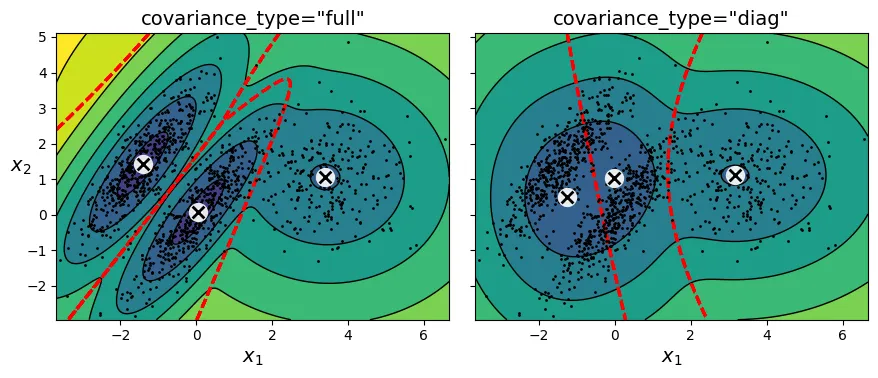
Phát hiện bất thường (Anomaly Detection) với GMM
Các điểm dữ liệu nằm trong vùng có mật độ thấp có thể được coi là bất thường. Chúng ta xác định ngưỡng mật độ (ví dụ: 2% thấp nhất) và coi tất cả các điểm dưới ngưỡng này là ngoại lai.
densities = gm.score_samples(X)
density_threshold = np.percentile(densities, 2)
anomalies = X[densities < density_threshold]
# extra code – tạo hình 8–18 đánh dấu các điểm bất thường
plt.figure(figsize=(8, 4))
plot_gaussian_mixture(gm, X)
plt.scatter(anomalies[:, 0], anomalies[:, 1], color='r', marker='*')
plt.ylim(top=5.1)
plt.show()

Lựa chọn số lượng cụm ()
Với GMM, chúng ta dùng BIC (Bayesian Information Criterion) hoặc AIC (Akaike Information Criterion). Cả hai chỉ số này đều phạt các mô hình phức tạp (nhiều tham số) và thưởng các mô hình khớp dữ liệu tốt (likelihood cao).
Giá trị BIC/AIC càng thấp càng tốt.
# extra code – tạo hình 8–19 giải thích BIC/AIC
from scipy.stats import norm
x_val = 2.5
std_val = 1.3
x_range = [-6, 4]
x_proba_range = [-2, 2]
stds_range = [1, 2]
xs = np.linspace(x_range[0], x_range[1], 501)
stds = np.linspace(stds_range[0], stds_range[1], 501)
Xs, Stds = np.meshgrid(xs, stds)
Z = 2 * norm.pdf(Xs - 1.0, 0, Stds) + norm.pdf(Xs + 4.0, 0, Stds)
Z = Z / Z.sum(axis=1)[:, np.newaxis] / (xs[1] - xs[0])
x_example_idx = (xs >= x_val).argmax()
max_idx = Z[:, x_example_idx].argmax()
max_val = Z[:, x_example_idx].max()
s_example_idx = (stds >= std_val).argmax()
x_range_min_idx = (xs >= x_proba_range[0]).argmax()
x_range_max_idx = (xs >= x_proba_range[1]).argmax()
log_max_idx = np.log(Z[:, x_example_idx]).argmax()
log_max_val = np.log(Z[:, x_example_idx]).max()
plt.figure(figsize=(8, 4.5))
plt.subplot(2, 2, 1)
plt.contourf(Xs, Stds, Z, cmap="GnBu")
plt.plot([-6, 4], [std_val, std_val], "k-", linewidth=2)
plt.plot([x_val, x_val], [1, 2], "b-", linewidth=2)
plt.ylabel(r"$\theta$", rotation=0, labelpad=10)
plt.title(r"Model $f(x; \theta)$")
plt.subplot(2, 2, 2)
plt.plot(stds, Z[:, x_example_idx], "b-")
plt.plot(stds[max_idx], max_val, "r.")
plt.plot([stds[max_idx], stds[max_idx]], [0, max_val], "r:")
plt.plot([0, stds[max_idx]], [max_val, max_val], "r:")
plt.text(stds[max_idx]+ 0.01, 0.081, r"$\hat{\theta}$")
plt.text(stds[max_idx]+ 0.01, max_val - 0.006, r"$Max$")
plt.text(1.01, max_val - 0.008, r"$\hat{\mathcal{L}}$")
plt.ylabel(r"$\mathcal{L}$", rotation=0, labelpad=10)
plt.title(fr"$\mathcal{{L}}(\theta|x={x_val}) = f(x={x_val}; \theta)$")
plt.grid()
plt.axis([1, 2, 0.08, 0.12])
plt.subplot(2, 2, 3)
plt.plot(xs, Z[s_example_idx], "k-")
plt.fill_between(xs[x_range_min_idx:x_range_max_idx+1],
Z[s_example_idx, x_range_min_idx:x_range_max_idx+1], alpha=0.2)
plt.xlabel(r"$x$")
plt.ylabel("PDF")
plt.title(fr"PDF $f(x; \theta={std_val})$")
plt.grid()
plt.axis([-6, 4, 0, 0.25])
plt.subplot(2, 2, 4)
plt.plot(stds, np.log(Z[:, x_example_idx]), "b-")
plt.plot(stds[log_max_idx], log_max_val, "r.")
plt.plot([stds[log_max_idx], stds[log_max_idx]], [-5, log_max_val], "r:")
plt.plot([0, stds[log_max_idx]], [log_max_val, log_max_val], "r:")
plt.text(stds[log_max_idx]+ 0.01, log_max_val - 0.06, r"$Max$")
plt.text(stds[log_max_idx]+ 0.01, -2.49, r"$\hat{\theta}$")
plt.text(1.01, log_max_val - 0.08, r"$\log \, \hat{\mathcal{L}}$")
plt.xlabel(r"$\theta$")
plt.ylabel(r"$\log\mathcal{L}$", rotation=0, labelpad=10)
plt.title(fr"$\log \, \mathcal{{L}}(\theta|x={x_val})$")
plt.grid()
plt.axis([1, 2, -2.5, -2.1])
plt.show()
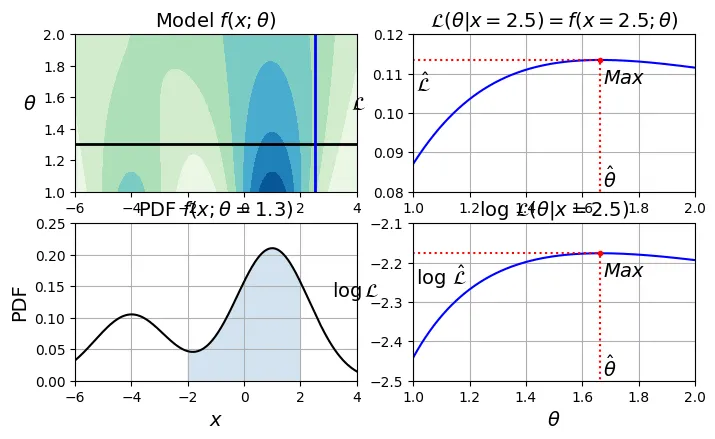
gm.bic(X)
8189.733705221636
gm.aic(X)
8102.508425106598
Công thức tính thủ công (để hiểu rõ hơn):
# extra code – tính BIC/AIC thủ công
n_clusters = 3
n_dims = 2
n_params_for_weights = n_clusters - 1
n_params_for_means = n_clusters * n_dims
n_params_for_covariance = n_clusters * n_dims * (n_dims + 1) // 2
n_params = n_params_for_weights + n_params_for_means + n_params_for_covariance
max_log_likelihood = gm.score(X) * len(X) # log(L^)
bic = np.log(len(X)) * n_params - 2 * max_log_likelihood
aic = 2 * n_params - 2 * max_log_likelihood
print(f"bic = {bic}")
print(f"aic = {aic}")
print(f"n_params = {n_params}")
bic = 8189.733705221636
aic = 8102.508425106598
n_params = 17
Biểu đồ dưới đây cho thấy BIC và AIC đạt giá trị thấp nhất tại , đúng như mong đợi.
# extra code – tạo hình 8–20 biểu đồ BIC/AIC theo k
gms_per_k = [GaussianMixture(n_components=k, n_init=10, random_state=42).fit(X)
for k in range(1, 11)]
bics = [model.bic(X) for model in gms_per_k]
aics = [model.aic(X) for model in gms_per_k]
plt.figure(figsize=(8, 3))
plt.plot(range(1, 11), bics, "bo-", label="BIC")
plt.plot(range(1, 11), aics, "go--", label="AIC")
plt.xlabel("$k$")
plt.ylabel("Information Criterion")
plt.axis([1, 9.5, min(aics) - 50, max(aics) + 50])
plt.annotate("", xy=(3, bics[2]), xytext=(3.4, 8650),
arrowprops=dict(facecolor='black', shrink=0.1))
plt.text(3.5, 8660, "Minimum", horizontalalignment="center")
plt.legend()
plt.grid()
plt.show()
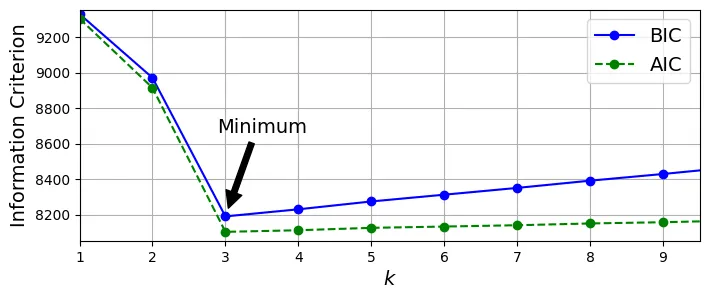
Mô hình Hỗn hợp Gaussian Bayes (Bayesian Gaussian Mixture)
Nếu bạn không muốn dò tìm , hãy dùng BayesianGaussianMixture. Bạn chỉ cần đặt lớn hơn số cụm thực tế, thuật toán sẽ tự động loại bỏ các cụm thừa bằng cách gán trọng số của chúng về 0.
from sklearn.mixture import BayesianGaussianMixture
# Đặt k=10, lớn hơn số cụm thực tế là 3
bgm = BayesianGaussianMixture(n_components=10, n_init=10, max_iter=500,
random_state=42)
bgm.fit(X)
bgm.weights_.round(2)
array([0.4 , 0.21, 0.39, 0. , 0. , 0. , 0. , 0. , 0. , 0. ])
Kết quả cho thấy chỉ có 3 trọng số là đáng kể, các trọng số khác đều bằng 0 hoặc xấp xỉ 0. Thuật toán đã tự động phát hiện số cụm đúng!
# extra code – vẽ kết quả của Bayesian GMM
plt.figure(figsize=(8, 5))
plot_gaussian_mixture(bgm, X)
plt.show()

Tuy nhiên, GMM vẫn bị giới hạn bởi giả định hình dạng cụm là elip. Với dữ liệu hình mặt trăng (moons), nó sẽ cố gắng khớp bằng nhiều hình elip nhỏ.
# extra code – tạo hình 8–21 GMM trên dữ liệu moons
X_moons, y_moons = make_moons(n_samples=1000, noise=0.05, random_state=42)
bgm = BayesianGaussianMixture(n_components=10, n_init=10, max_iter=500, random_state=42)
bgm.fit(X_moons)
plt.figure(figsize=(9, 3.2))
plt.subplot(121)
plot_data(X_moons)
plt.xlabel("$x_1$")
plt.ylabel("$x_2$", rotation=0)
plt.grid()
plt.subplot(122)
plot_gaussian_mixture(bgm, X_moons, show_ylabels=False)
plt.show()

7. Bài tập thực hành: Bộ dữ liệu khuôn mặt Olivetti
Phần này sẽ hướng dẫn giải chi tiết các bài tập cuối chương liên quan đến bộ dữ liệu khuôn mặt Olivetti.
Chuẩn bị dữ liệu
Bộ dữ liệu Olivetti chứa 400 ảnh đen trắng (64x64 pixel) của 40 người (mỗi người 10 ảnh). Nhiệm vụ thông thường là nhận diện khuôn mặt.
import os
import urllib.request
from sklearn.datasets import fetch_olivetti_faces
# 1. Define the path. Scikit-learn looks in the root of data_home for this specific file.
data_home = os.path.expanduser("~/scikit_learn_data")
if not os.path.exists(data_home):
os.makedirs(data_home)
# 2. Define the working URL (Mirror) and target path
url = "https://github.com/probml/pmtk3/raw/master/bigData/olivettiFaces/olivettiFaces.mat"
target_path = os.path.join(data_home, "olivettifaces.mat")
# 3. Download the file manually
if not os.path.exists(target_path):
print(f"Downloading to {target_path}...")
try:
urllib.request.urlretrieve(url, target_path)
print("Download successful!")
except Exception as e:
print(f"Failed to download: {e}")
else:
print(f"File already exists at {target_path}")
# 4. Load the dataset
# Scikit-learn will see the local file and skip the broken Figshare download
try:
olivetti = fetch_olivetti_faces()
print(f"\nSuccess! Dataset loaded: {olivetti.images.shape}")
except Exception as e:
print(f"\nError loading dataset: {e}")
Downloading to /root/scikit_learn_data/olivettifaces.mat...
Download successful!
downloading Olivetti faces from https://ndownloader.figshare.com/files/5976027 to /root/scikit_learn_data
Success! Dataset loaded: (400, 64, 64)
olivetti.target
array([ 0, 0, 0, 0, 0, 0, 0, 0, 0, 0, 1, 1, 1, 1, 1, 1, 1,
1, 1, 1, 2, 2, 2, 2, 2, 2, 2, 2, 2, 2, 3, 3, 3, 3,
3, 3, 3, 3, 3, 3, 4, 4, 4, 4, 4, 4, 4, 4, 4, 4, 5,
5, 5, 5, 5, 5, 5, 5, 5, 5, 6, 6, 6, 6, 6, 6, 6, 6,
6, 6, 7, 7, 7, 7, 7, 7, 7, 7, 7, 7, 8, 8, 8, 8, 8,
8, 8, 8, 8, 8, 9, 9, 9, 9, 9, 9, 9, 9, 9, 9, 10, 10,
10, 10, 10, 10, 10, 10, 10, 10, 11, 11, 11, 11, 11, 11, 11, 11, 11,
11, 12, 12, 12, 12, 12, 12, 12, 12, 12, 12, 13, 13, 13, 13, 13, 13,
13, 13, 13, 13, 14, 14, 14, 14, 14, 14, 14, 14, 14, 14, 15, 15, 15,
15, 15, 15, 15, 15, 15, 15, 16, 16, 16, 16, 16, 16, 16, 16, 16, 16,
17, 17, 17, 17, 17, 17, 17, 17, 17, 17, 18, 18, 18, 18, 18, 18, 18,
18, 18, 18, 19, 19, 19, 19, 19, 19, 19, 19, 19, 19, 20, 20, 20, 20,
20, 20, 20, 20, 20, 20, 21, 21, 21, 21, 21, 21, 21, 21, 21, 21, 22,
22, 22, 22, 22, 22, 22, 22, 22, 22, 23, 23, 23, 23, 23, 23, 23, 23,
23, 23, 24, 24, 24, 24, 24, 24, 24, 24, 24, 24, 25, 25, 25, 25, 25,
25, 25, 25, 25, 25, 26, 26, 26, 26, 26, 26, 26, 26, 26, 26, 27, 27,
27, 27, 27, 27, 27, 27, 27, 27, 28, 28, 28, 28, 28, 28, 28, 28, 28,
28, 29, 29, 29, 29, 29, 29, 29, 29, 29, 29, 30, 30, 30, 30, 30, 30,
30, 30, 30, 30, 31, 31, 31, 31, 31, 31, 31, 31, 31, 31, 32, 32, 32,
32, 32, 32, 32, 32, 32, 32, 33, 33, 33, 33, 33, 33, 33, 33, 33, 33,
34, 34, 34, 34, 34, 34, 34, 34, 34, 34, 35, 35, 35, 35, 35, 35, 35,
35, 35, 35, 36, 36, 36, 36, 36, 36, 36, 36, 36, 36, 37, 37, 37, 37,
37, 37, 37, 37, 37, 37, 38, 38, 38, 38, 38, 38, 38, 38, 38, 38, 39,
39, 39, 39, 39, 39, 39, 39, 39, 39])
Chúng ta sẽ chia bộ dữ liệu thành Train/Validation/Test, sử dụng StratifiedShuffleSplit để đảm bảo mỗi người đều có ảnh trong cả 3 tập.
from sklearn.model_selection import StratifiedShuffleSplit
strat_split = StratifiedShuffleSplit(n_splits=1, test_size=40, random_state=42)
train_valid_idx, test_idx = next(strat_split.split(olivetti.data,
olivetti.target))
X_train_valid = olivetti.data[train_valid_idx]
y_train_valid = olivetti.target[train_valid_idx]
X_test = olivetti.data[test_idx]
y_test = olivetti.target[test_idx]
strat_split = StratifiedShuffleSplit(n_splits=1, test_size=80, random_state=43)
train_idx, valid_idx = next(strat_split.split(X_train_valid, y_train_valid))
X_train = X_train_valid[train_idx]
y_train = y_train_valid[train_idx]
X_valid = X_train_valid[valid_idx]
y_valid = y_train_valid[valid_idx]
print(X_train.shape, y_train.shape)
print(X_valid.shape, y_valid.shape)
print(X_test.shape, y_test.shape)
(280, 4096) (280,)
(80, 4096) (80,)
(40, 4096) (40,)
Để tăng tốc độ phân cụm, chúng ta giảm chiều dữ liệu bằng PCA (giữ lại 99% phương sai).
from sklearn.decomposition import PCA
pca = PCA(0.99)
X_train_pca = pca.fit_transform(X_train)
X_valid_pca = pca.transform(X_valid)
X_test_pca = pca.transform(X_test)
pca.n_components_
np.int64(199)
Phân cụm khuôn mặt với K-Means
Chúng ta sẽ thử nghiệm các giá trị từ 5 đến 145 để tìm số cụm tối ưu, sử dụng Silhouette Score.
from sklearn.cluster import KMeans
k_range = range(5, 150, 5)
kmeans_per_k = []
for k in k_range:
print(f"k={k}")
kmeans = KMeans(n_clusters=k, random_state=42)
kmeans.fit(X_train_pca)
kmeans_per_k.append(kmeans)
k=5
k=10
k=15
k=20
k=25
k=30
k=35
k=40
k=45
k=50
k=55
k=60
k=65
k=70
k=75
k=80
k=85
k=90
k=95
k=100
k=105
k=110
k=115
k=120
k=125
k=130
k=135
k=140
k=145
from sklearn.metrics import silhouette_score
silhouette_scores = [silhouette_score(X_train_pca, model.labels_)
for model in kmeans_per_k]
best_index = np.argmax(silhouette_scores)
best_k = k_range[best_index]
best_score = silhouette_scores[best_index]
plt.figure(figsize=(8, 3))
plt.plot(k_range, silhouette_scores, "bo-")
plt.xlabel("$k$")
plt.ylabel("Silhouette score")
plt.plot(best_k, best_score, "rs")
plt.grid()
plt.show()

best_k
75
Kết quả tốt nhất là (hoặc lân cận). Mặc dù chỉ có 40 người, nhưng mỗi người có nhiều biểu cảm và góc chụp, nên số cụm lớn hơn 40 là hợp lý.
Ta cũng có thể vẽ biểu đồ Inertia để tham khảo (dù không thấy rõ điểm khuỷu tay).
inertias = [model.inertia_ for model in kmeans_per_k]
best_inertia = inertias[best_index]
plt.figure(figsize=(8, 3.5))
plt.plot(k_range, inertias, "bo-")
plt.xlabel("$k$")
plt.ylabel("Inertia")
plt.plot(best_k, best_inertia, "rs")
plt.grid()
plt.show()
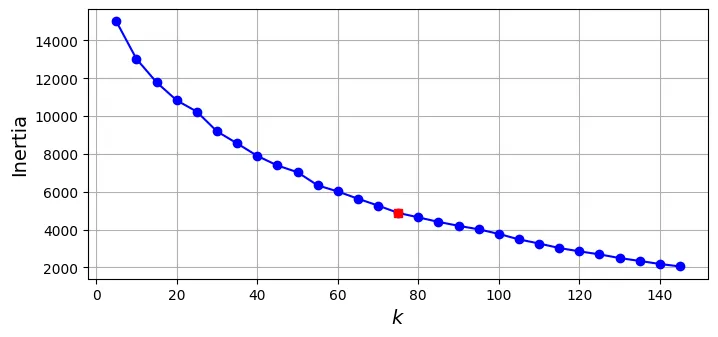
best_model = kmeans_per_k[best_index]
Hãy quan sát các khuôn mặt trong từng cụm để xem K-Means đã gom nhóm tốt chưa.
# Hàm vẽ các khuôn mặt
def plot_faces(faces, labels, n_cols=5):
faces = faces.reshape(-1, 64, 64)
n_rows = (len(faces) - 1) // n_cols + 1
plt.figure(figsize=(n_cols, n_rows * 1.1))
for index, (face, label) in enumerate(zip(faces, labels)):
plt.subplot(n_rows, n_cols, index + 1)
plt.imshow(face, cmap="gray")
plt.axis("off")
plt.title(label)
plt.show()
for cluster_id in np.unique(best_model.labels_):
print("Cluster", cluster_id)
in_cluster = best_model.labels_==cluster_id
faces = X_train[in_cluster]
labels = y_train[in_cluster]
plot_faces(faces, labels)
Cluster 0

Cluster 1

Cluster 2

Cluster 3

Cluster 4

Cluster 5

Cluster 6

Cluster 7

Cluster 8

Cluster 9

Cluster 10

Cluster 11

Cluster 12

Cluster 13

Cluster 14

Cluster 15

Cluster 16

Cluster 17

Cluster 18

Cluster 19

Cluster 20

Cluster 21

Cluster 22

Cluster 23

Cluster 24

Cluster 25

Cluster 26

Cluster 27

Cluster 28

Cluster 29

Cluster 30

Cluster 31

Cluster 32

Cluster 33

Cluster 34

Cluster 35

Cluster 36

Cluster 37

Cluster 38

Cluster 39

Cluster 40

Cluster 41

Cluster 42

Cluster 43

Cluster 44

Cluster 45

Cluster 46

Cluster 47

Cluster 48

Cluster 49

Cluster 50

Cluster 51

Cluster 52

Cluster 53

Cluster 54

Cluster 55

Cluster 56

Cluster 57

Cluster 58

Cluster 59

Cluster 60

Cluster 61

Cluster 62

Cluster 63

Cluster 64

Cluster 65

Cluster 66

Cluster 67

Cluster 68

Cluster 69

Cluster 70

Cluster 71

Cluster 72

Cluster 73

Cluster 74

Sử dụng Phân cụm để tiền xử lý cho Phân loại
Thử nghiệm xem liệu việc sử dụng K-Means để giảm chiều dữ liệu (thay thế ảnh gốc bằng khoảng cách đến các tâm cụm) có giúp cải thiện mô hình phân loại (Random Forest) hay không.
# Huấn luyện Random Forest trên dữ liệu gốc (đã qua PCA)
from sklearn.ensemble import RandomForestClassifier
clf = RandomForestClassifier(n_estimators=150, random_state=42)
clf.fit(X_train_pca, y_train)
clf.score(X_valid_pca, y_valid)
0.9375
# Huấn luyện trên dữ liệu đã giảm chiều bằng K-Means
X_train_reduced = best_model.transform(X_train_pca)
X_valid_reduced = best_model.transform(X_valid_pca)
X_test_reduced = best_model.transform(X_test_pca)
clf = RandomForestClassifier(n_estimators=150, random_state=42)
clf.fit(X_train_reduced, y_train)
clf.score(X_valid_reduced, y_valid)
0.7375
Độ chính xác giảm đi đáng kể! Điều này cho thấy thông tin khoảng cách đến tâm cụm làm mất đi quá nhiều chi tiết quan trọng để phân biệt người này với người kia.
Ngay cả khi thử tìm tốt nhất cho việc phân loại, kết quả vẫn không khả quan hơn.
from sklearn.pipeline import make_pipeline
for n_clusters in k_range:
pipeline = make_pipeline(
KMeans(n_clusters=n_clusters, random_state=42),
RandomForestClassifier(n_estimators=150, random_state=42)
)
pipeline.fit(X_train_pca, y_train)
print(n_clusters, pipeline.score(X_valid_pca, y_valid))
5 0.4
10 0.4375
15 0.5875
20 0.6
25 0.6625
30 0.6625
35 0.6625
40 0.675
45 0.6625
50 0.6875
55 0.75
60 0.6875
65 0.725
70 0.7
75 0.7375
80 0.725
85 0.7625
90 0.775
95 0.775
100 0.7625
105 0.75
110 0.725
115 0.7625
120 0.7625
125 0.7375
130 0.7375
135 0.725
140 0.8
145 0.725
Tuy nhiên, nếu kết hợp cả đặc trưng gốc (PCA) và đặc trưng từ cụm (extended features), kết quả có cải thiện một chút so với chỉ dùng cụm, nhưng vẫn không vượt qua được baseline.
X_train_extended = np.c_[X_train_pca, X_train_reduced]
X_valid_extended = np.c_[X_valid_pca, X_valid_reduced]
X_test_extended = np.c_[X_test_pca, X_test_reduced]
clf = RandomForestClassifier(n_estimators=150, random_state=42)
clf.fit(X_train_extended, y_train)
clf.score(X_valid_extended, y_valid)
0.85
GMM: Sinh khuôn mặt mới và Phát hiện bất thường
Huấn luyện GMM trên dữ liệu khuôn mặt và sử dụng nó để sinh ra các khuôn mặt mới.
from sklearn.mixture import GaussianMixture
gm = GaussianMixture(n_components=40, random_state=42)
y_pred = gm.fit_predict(X_train_pca)
# Sinh 20 khuôn mặt mới
n_gen_faces = 20
gen_faces_reduced, y_gen_faces = gm.sample(n_samples=n_gen_faces)
gen_faces = pca.inverse_transform(gen_faces_reduced)
plot_faces(gen_faces, y_gen_faces)
/usr/local/lib/python3.12/dist-packages/sklearn/mixture/_base.py:468: RuntimeWarning: covariance is not symmetric positive-semidefinite.
rng.multivariate_normal(mean, covariance, int(sample))

Bây giờ, hãy tạo ra một số “ảnh lỗi” (xoay, lật, làm tối) và xem GMM có phát hiện ra chúng là bất thường không.
n_rotated = 4
rotated = np.transpose(X_train[:n_rotated].reshape(-1, 64, 64), axes=[0, 2, 1])
rotated = rotated.reshape(-1, 64*64)
y_rotated = y_train[:n_rotated]
n_flipped = 3
flipped = X_train[:n_flipped].reshape(-1, 64, 64)[:, ::-1]
flipped = flipped.reshape(-1, 64*64)
y_flipped = y_train[:n_flipped]
n_darkened = 3
darkened = X_train[:n_darkened].copy()
darkened[:, 1:-1] *= 0.3
y_darkened = y_train[:n_darkened]
X_bad_faces = np.r_[rotated, flipped, darkened]
y_bad = np.concatenate([y_rotated, y_flipped, y_darkened])
plot_faces(X_bad_faces, y_bad)
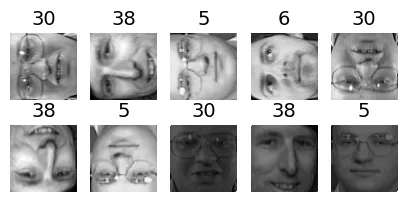
Kiểm tra điểm số (log-likelihood) của các ảnh lỗi này. Giá trị rất thấp (âm rất lớn) chứng tỏ GMM đánh giá chúng là cực kỳ khó xảy ra (bất thường).
X_bad_faces_pca = pca.transform(X_bad_faces)
gm.score_samples(X_bad_faces_pca)
array([-19610904., -17223394., -41810812., -50242452., -32037220.,
-13569778., -29925510., -87415344., -97655488., -51947340.],
dtype=float32)
So sánh với điểm số của các ảnh bình thường (cao hơn nhiều):
gm.score_samples(X_train_pca[:10])
array([1162.6652, 1111.7946, 1156.0321, 1170.4318, 1073.5156, 1139.5026,
1113.5194, 1073.5156, 1048.4954, 1048.4954], dtype=float32)
Sử dụng PCA để phát hiện bất thường
Một kỹ thuật khác là dùng sai số tái tạo (reconstruction error) của PCA. PCA nén dữ liệu bằng cách giữ lại các đặc trưng chính (khuôn mặt chuẩn). Khi gặp ảnh bất thường, PCA sẽ cố gắng tái tạo nó thành khuôn mặt chuẩn, dẫn đến sai số lớn giữa ảnh gốc và ảnh tái tạo.
X_train_pca.round(2)
array([[ -3.78, 1.85, -5.14, ..., 0.14, -0.21, 0.06],
[-10.15, 1.53, -0.77, ..., -0.12, -0.14, -0.02],
[ 10.02, -2.88, -0.92, ..., -0.07, -0. , 0.12],
...,
[ -2.48, -2.96, 1.3 , ..., 0.02, 0.03, -0.15],
[ 3.22, -5.35, 1.39, ..., -0.06, -0.23, 0.16],
[ 0.92, 3.65, 2.26, ..., -0.14, -0.07, 0.06]],
dtype=float32)
def reconstruction_errors(pca, X):
X_pca = pca.transform(X)
X_reconstructed = pca.inverse_transform(X_pca)
mse = np.square(X_reconstructed - X).mean(axis=-1)
return mse
# Sai số tái tạo trung bình của ảnh thật
reconstruction_errors(pca, X_train).mean()
np.float32(0.00019205351)
# Sai số tái tạo trung bình của ảnh lỗi (lớn hơn nhiều)
reconstruction_errors(pca, X_bad_faces).mean()
np.float32(0.004707354)
Hãy xem PCA đã “sửa” các ảnh lỗi như thế nào khi tái tạo chúng (nó xoay ngược lại, lật lại, làm sáng lại để giống mặt người nhất có thể).
plot_faces(X_bad_faces, y_bad)

X_bad_faces_reconstructed = pca.inverse_transform(X_bad_faces_pca)
plot_faces(X_bad_faces_reconstructed, y_bad)